

Descrición
Upgrade To Pro! | Live Demo | Module Demo | Support
Interactive Image
Interactive Real Estate helps you show buildings and floor plans in a clear, interactive way on WordPress. You can add clickable areas, connect them to flats or floors, and show useful property details. It is simple to use and does not require coding.
Easy Area Selection
Select areas easily on your building image and add extra details for each one. After you create a selection, you can edit it any time.
Zoom and Pan
Use zoom and pan to work on small details more easily. Zoom in while drawing polygons, then press the spacebar to move around the image.
Choose SVG Path Colors
Change SVG path colors to match your design. Pick a color and apply it in a few clicks.
Project Export / Import
Export and import full projects in a simple way.
Why it helps:
– Save time: Copy projects without rebuilding them by hand
– Keep backups: Store your project settings safely
Flat Types
If many apartments share the same layout, area, or room count, you can save them as a flat type. Then you can reuse that type instead of creating the same data again and again.
Key Features
- Create SVG areas on top of a building image
- Use zoom and pan to edit polygons more easily
- Preview changes in real time
- Create blocks, floors, flats, and flat types, then connect them to polygons
- Add clickable zones to a floor plan
- Use shortcodes to place the plugin anywhere on your site
- Open a link when a path is clicked
- Open a modal when a path is clicked
⭐ Premium Features
- Create unlimited projects (1 in the free version)
- Create unlimited flats (25 in the free version)
- Run a script when a path is clicked
- Customize SVG path colors
- Use project export and import
- Change the currency icon
- Get 24/7 premium support
- Get access to updates
⭐ Gold Features
- Everything in Premium
- Let clients fill out a request callback form
- Read form responses
- Create a shareable flat link
- Use the flats list shortcode with filters
- Custom Flats Field Builder
- Custom Table Field Builder
- Custom statuses (sold, reserved, etc.)
This plugin helps you show property listings in a more useful and modern way than a static image or simple floor plan.
Upgrade to Interactive Real Estate Premium to unlock more features and options:
Why Choose Interactive Real Estate?
For Building Companies:
- Stand out: Show properties in a more modern and engaging way
- Show more details: Present floor plans, apartment layouts, and pricing clearly
- Save time: Manage project data in one organized system
Live Demos and Tutorials
Want to see how it works? Start here:
- Live Demo: See the plugin in action
- Video Tutorial: Watch the setup step by step
- Documentation: Read the full guide and FAQs
If you want to make your property listings easier to explore, Interactive Real Estate gives you a simple way to do it. You can use it for one building or a full project.
Video Tutorial
If you want a simple step-by-step guide, watch the video tutorial here:
Source Code
The unminified JavaScript and CSS source code is available here:
link
Build Instructions
To rebuild the minified JavaScript files:
- Clone or download the repository.
- Run
npm installto install dependencies. - Run
npm run buildto generate the minified files. - The minified files will be located in
dist/assets/index.js.
Plugin Support
For support, visit https://www.ireplugin.com/contact. You can also email interactiverealestateplugin@gmail.com.
License
Interactive Real Estate is licensed under GPL2. For more details, see the GPL2 License.
Capturas
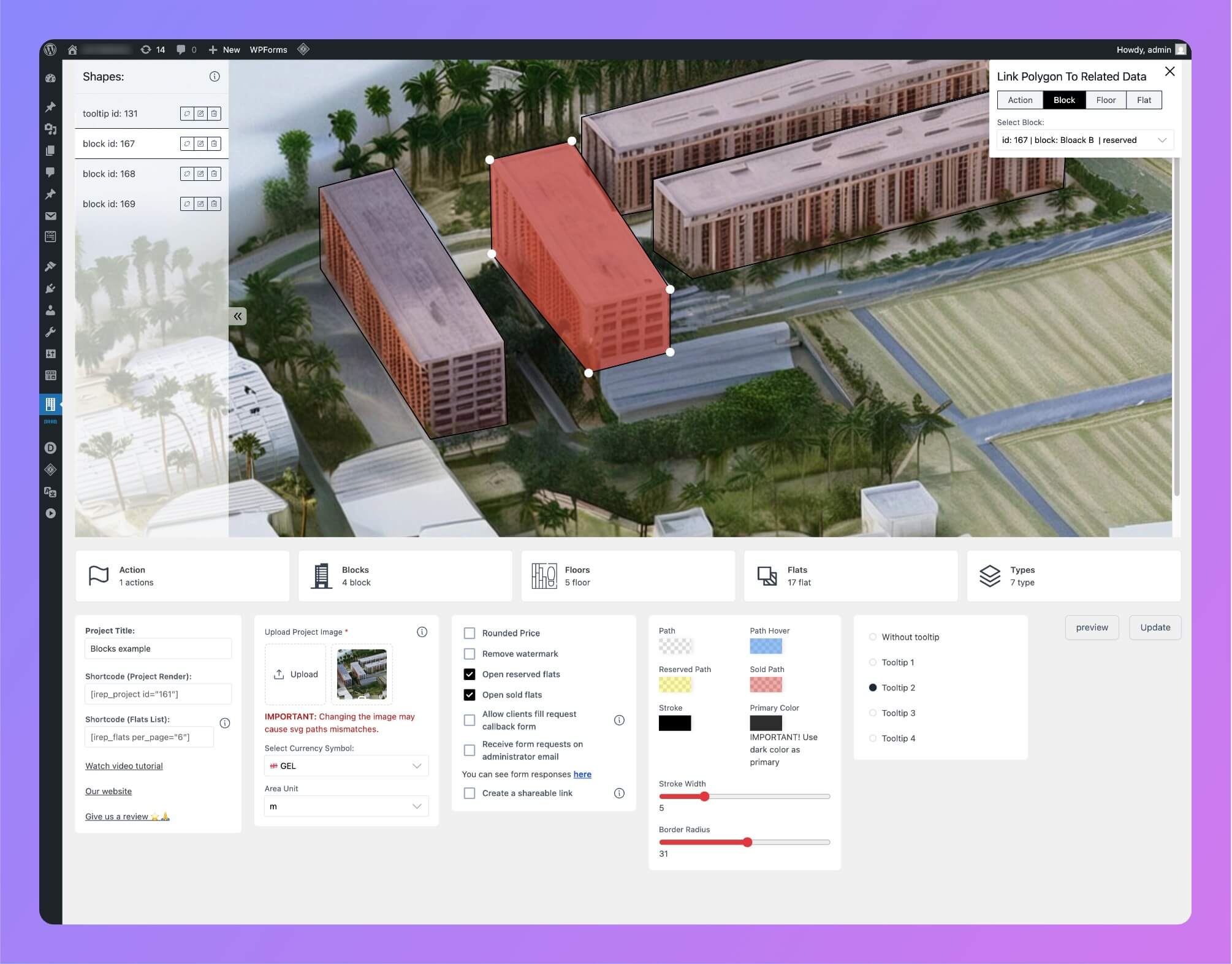
Interactive building module 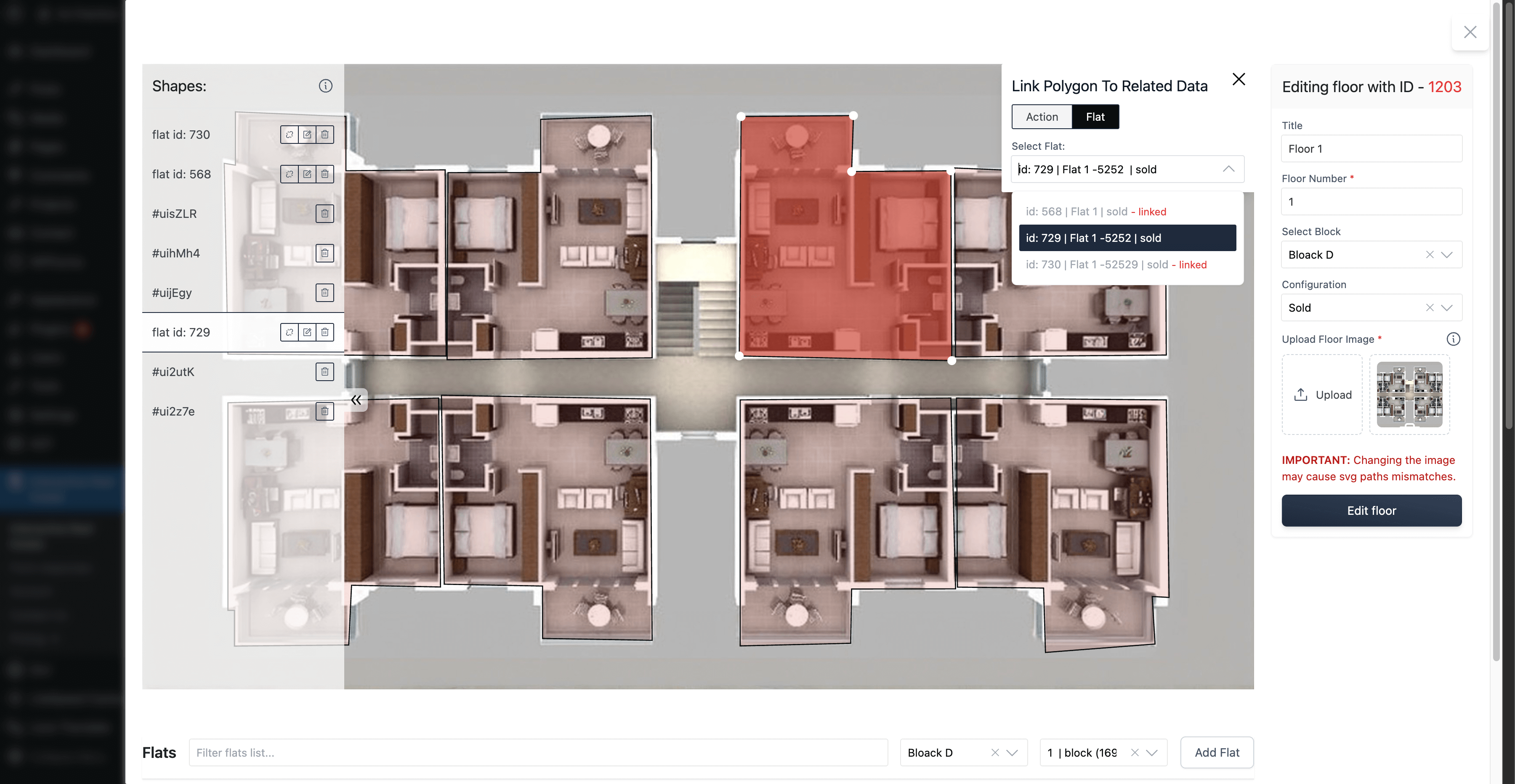
Flats list 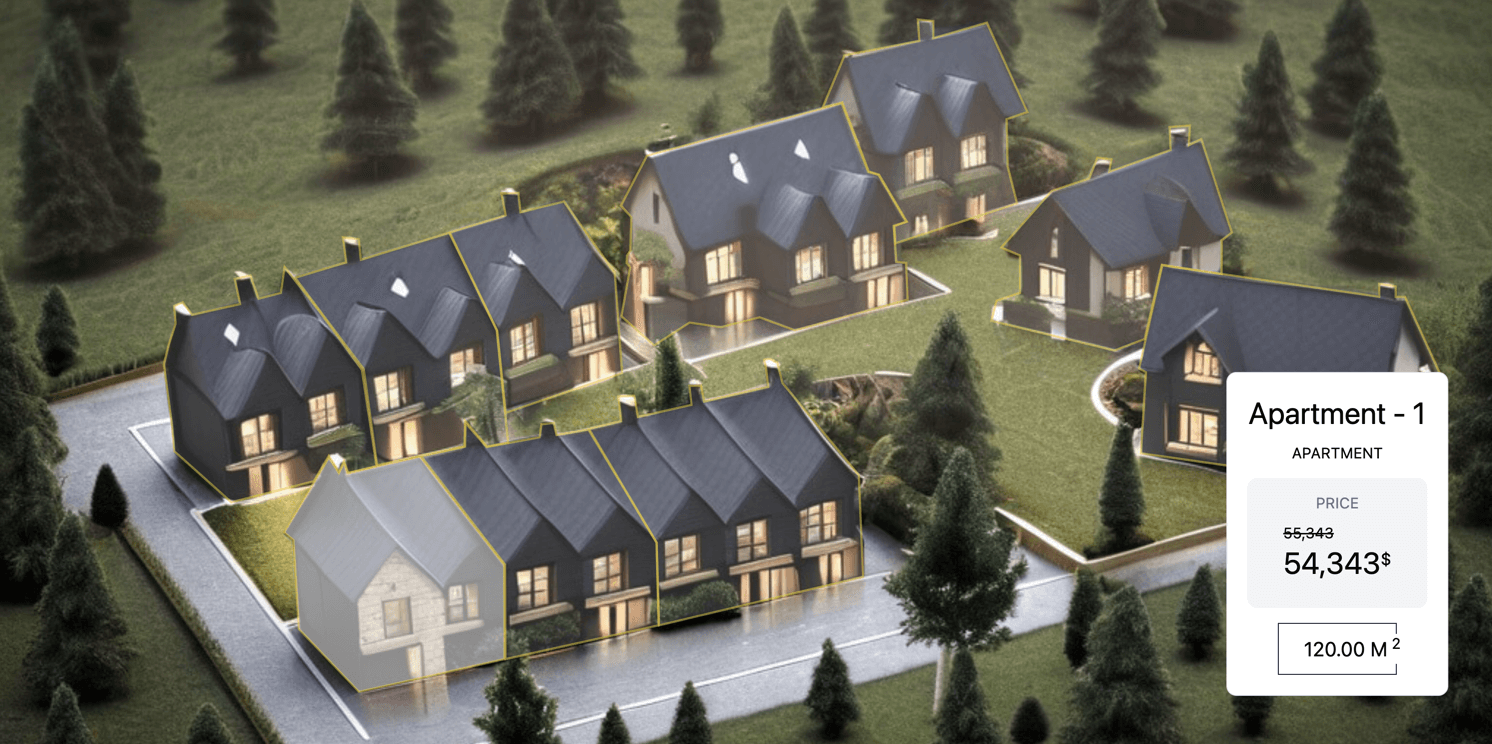
Create interactive floor plan 
Edit flat 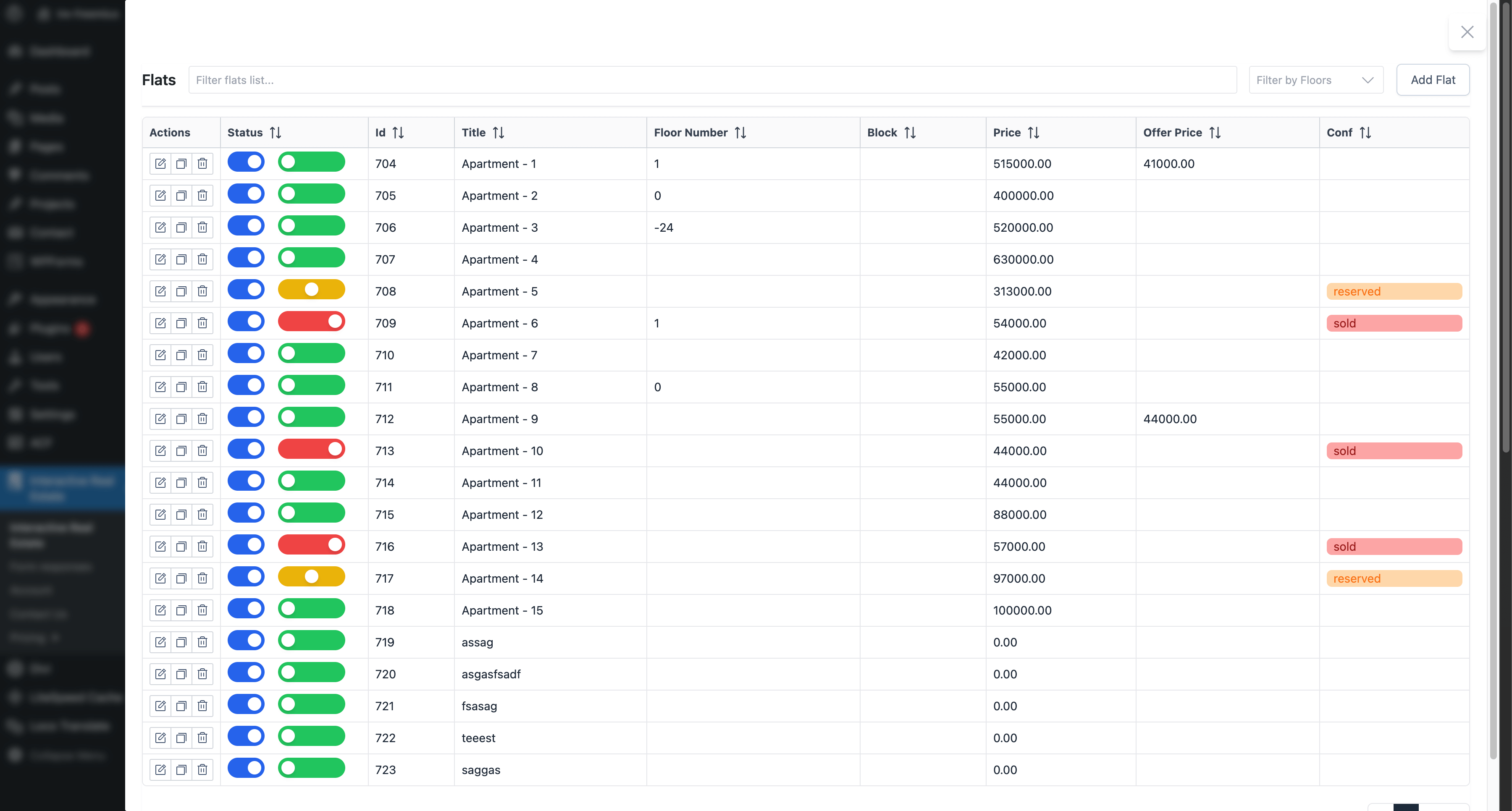
Interactive real estate cottages demo 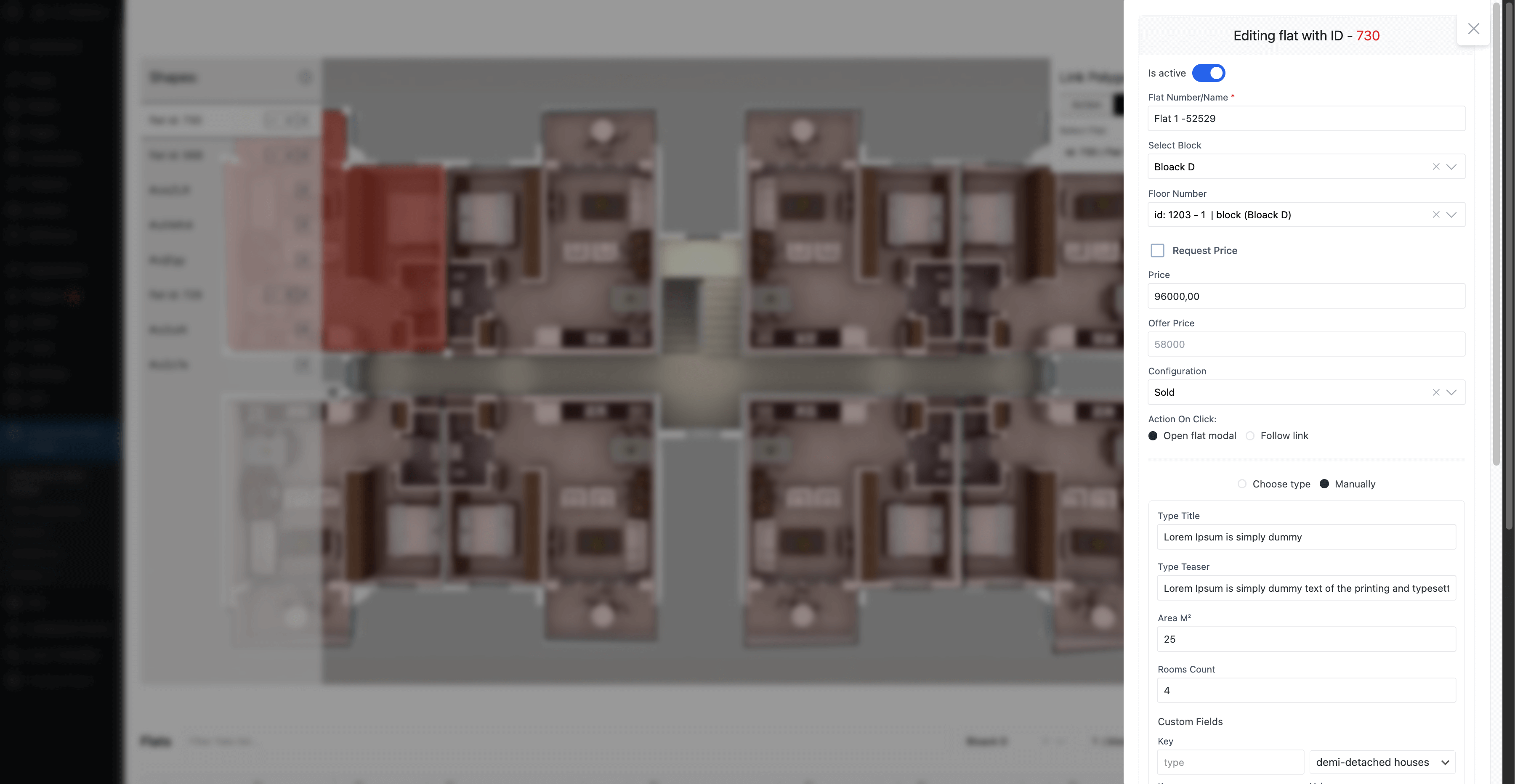
Block buildings example, create hotspots 

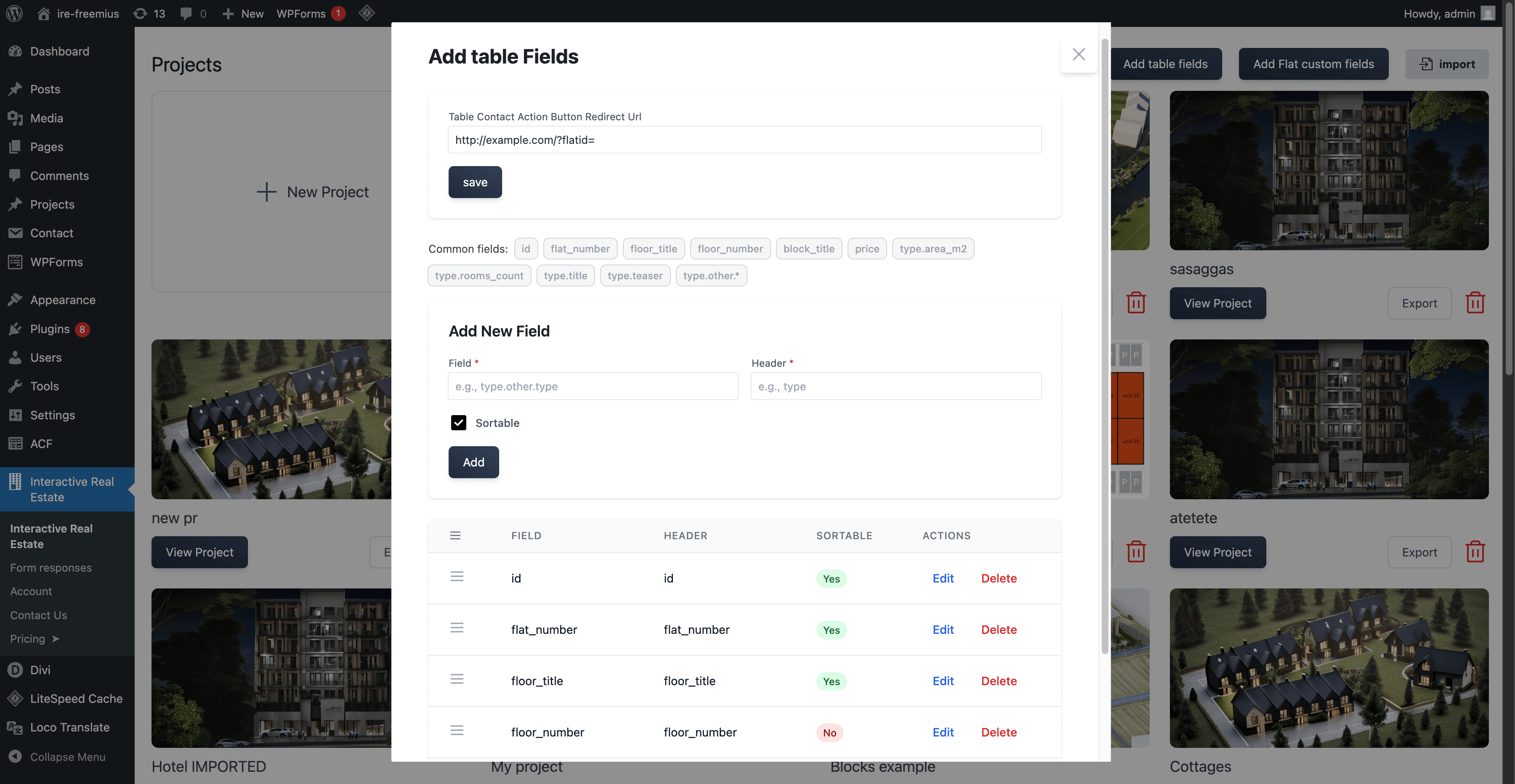
Blocks
Este plugin proporciona 2 bloques.
- IRE Flats
- IRE Project
Instalación
- Install the plugin from the WordPress Plugin Installer, or upload the ZIP file from WordPress.org.
- Activate the plugin.
- Open Interactive Real Estate in your WordPress dashboard.
Preguntas frecuentes
-
- Create unlimited projects (1 in the free version)
- Create unlimited flats (25 in the free version)
- Run a script when a path is clicked
- Customize SVG path colors
- Project export/import
- Currency icon customization
- 24/7 premium support
- Access to updates
-
How do I use the Interactive Real Estate features?
-
To create an interactive building, use the
[irep_building]shortcode. Then upload your image, add clickable areas, and manage everything from the plugin settings page. -
Can I use this plugin for multiple buildings?
-
Yes. You can create interactive buildings and manage each one separately. You can also place them anywhere on your site with shortcodes. The free plan allows 1 project.
-
How to add hotspots?
-
You can try the module demo to see how hotspot creation works.
-
Do I need to know how to code?
-
No. The plugin is made for non-technical users too. You can upload your images, add areas, and use the shortcode without writing code.
-
Is there a demo available?
-
Yes. Visit https://www.ireplugin.com/demos to see the plugin in action.
Have questions? See the documentation.
-
I have a question or need help with the plugin, how do I contact your support team?
-
To contact support, post in our WordPress support forum or use the contact page on our website.
Comentarios


Colaboradores e desenvolvedores
“Interactive Image – Real Estate Visualizer & Image Map” é un software de código aberto. As seguintes persoas colaboraron con este plugin.
Colaboradores

Traduce “Interactive Image – Real Estate Visualizer & Image Map” ao teu idioma.
Interesado no desenvolvemento?
Revisa o código, bota unha ollada aorepositorio SVN, ou subscríbete ao log de desenvolvemento por RSS.
Rexistro de cambios
2.3.0
- feat: support apartment price history add-on
- feat: make table action icon changeable
- feat: filters by block id in flats list shortcode
- feat: add 2 Gutenberg blocks for our shortcodes
- feat: second type of flat preview modal
- style: optimize flat list shortcode styles
- style: optimize apartment modal UI
- fix: import project bugs
2.2.1
- feat: add dynamic filters feature in ‘irep_flats’ shortcode
- fix: visual bugs in shortcodes
2.2.0
- feat: dynamic statuses
- feat: optimize zooming and panning in canvas
- feat: add circles on already created svg path
- refactor: remove preview images (now they are coming from the plugin website)
2.1.2
- feat: add drag and drop where needed
- style: improved shortcode UI
- fix: floor saving issue
2.1.1
- feat: change flat config from list with switcher
- feat: flats table component responsive
- fix: remove reset.css in shortcode components
2.1.0
- feat: flat custom fields feature
- feat: flat active status changing with switcher
- feat: table view feature in ‘[irep_flats]’ shortcode with sorting and filters
- feat: add filters in ‘[irep_flats]’ shortcode
- fix: bugs
If upgrading from a previous version, please verify your flat floor assignments as the connection method has changed from title-based to ID-based matching.
2.0.4
- fix: Import/Export project bugs
2.0.3
- feat: send form responses to administrator mail
- fix: form UI in flat modal
2.0.1
- refactor: minor changes in UI
2.0.0
- feat: add
irep_flatsshortcode to display flats list with filters - feat: allow clients fill request callback form
- feat: read form responses
- feat: create a shareable flat link
- feat: add primary color feature
- feat: create GOLD plan license
- refactor: optimized code & fixed bugs
1.0.12
- feat: add area units support
- fix: prevent nonce conflict due to caching
1.0.11
- feat: add request price feature on flat prices.
1.0.10
- refactor: remove required on price field to hide price as user wants.
- fix: export/import issue.
1.0.9
- refactor: shortcode code is more lightweight
- refactor: optimize folder structure
- refactor: add follow link feature on flat click
- style: optimized shortcode component styles
1.0.8
- refactor: optimized styling of tooltips and flat preview modal.
- feat: added 3 config: rounded price, open reserved flats, open sold flats.
- fix: minor bugs about floor/flat saving.
1.0.7
- fix: project request blocking issue caused by Wordfence plugin compatibility.
1.0.6
- feat: export/import project.
- tooltip styles.
1.0.5
- Create modal for flat detail view.
- translate plugin.
1.0.4
- Added a new DB class to handle CRUD (Create, Read, Update, Delete) operations for database manipulations in the plugin.
- Optimization: Improved code structure and performance for better maintainability and efficiency.
1.0.3
- feat: Added two new tooltips for improved user guidance. Resolved JavaScript enqueue conflicts, ensuring compatibility across multiple themes.
1.0.2
- add image border radius feature
1.0.1
- Updated Freemius SDK to the latest version.
1.0.0
- Initial release of the Interactive Real Estate plugin.