
Descrición
Accept cryptocurrency payments directly into your own wallet—with no ChainCheckout transaction fees and no third-party account required.
ChainCheckout is a non-custodial cryptocurrency payment gateway for WooCommerce. It lets merchants accept cryptocurrency while keeping control of their funds and using a wallet they already own.
Unlike custodial payment solutions that receive and hold your cryptocurrency on your behalf, ChainCheckout sends payments directly to the wallet you configure. Your customers get a familiar WooCommerce checkout experience while you retain ownership of your cryptocurrency.
Whether you sell physical products, digital downloads, memberships, subscriptions, services, or collect donations, ChainCheckout provides a simple way to add cryptocurrency payments to your WooCommerce store without giving up control of your funds.
🚀 WHY STORE OWNERS CHOOSE CHAINCHECKOUT
💰 Keep 100% of Your Crypto Revenue
Keep more of every cryptocurrency payment your business earns.
-
No ChainCheckout Transaction Fees — ChainCheckout never charges transaction fees on your cryptocurrency sales, so you keep 100% of your crypto revenue. (Note: the blockchain network itself may charge a small network/gas fee to process the transaction. This is set by the network, not by ChainCheckout, and applies to cryptocurrency transactions regardless of platform.)
-
Live Exchange Rates — Automatically calculate cryptocurrency payment amounts using live market exchange rates.
-
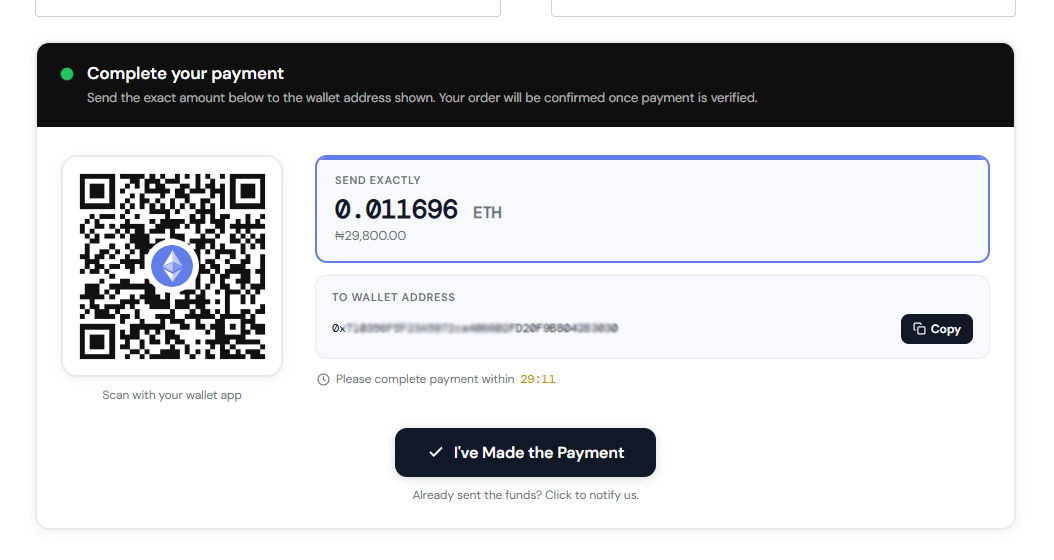
Transparent Pricing — Customers see exactly how much cryptocurrency to send before completing payment.
-
Clear Network Instructions — Customers are told which network to send on (for example TRC-20 (TRON) or Bitcoin), with a warning that funds sent on the wrong network can’t be recovered.
🔐 Direct Payments to Your Own Wallet
Your cryptocurrency goes directly to the wallet you own and control.
- Direct Wallet Payments — Receive payments directly into the wallet you configure.
- Non-Custodial by Design — ChainCheckout never stores, holds, or takes custody of your cryptocurrency.
- Use Your Existing Wallet — Configure the wallet you already trust without creating an additional merchant account.
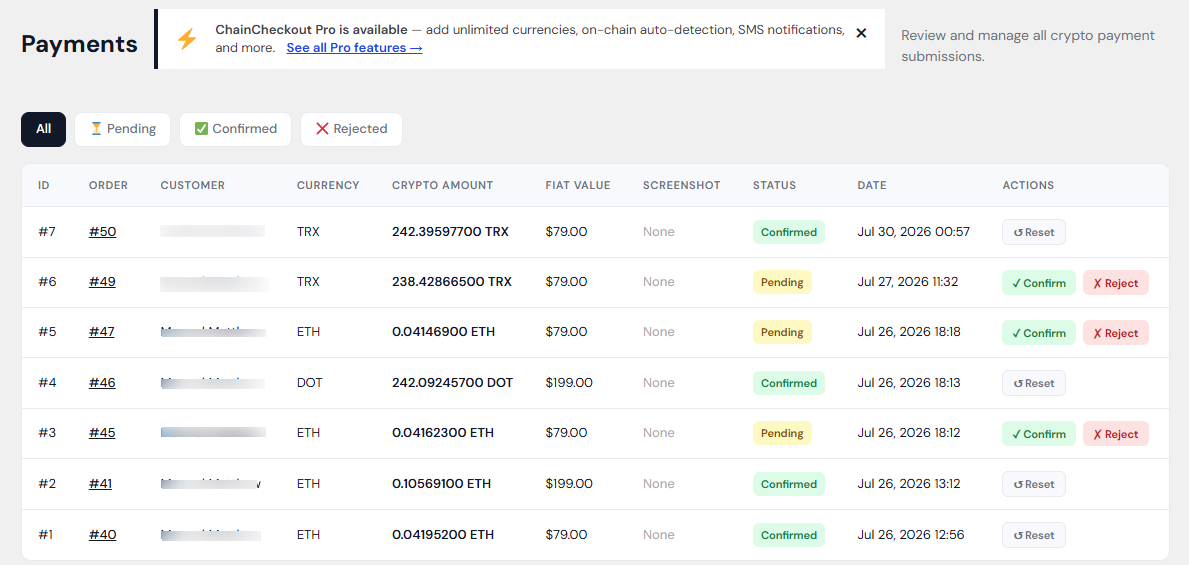
- Flexible Payment Confirmation — Confirm payments manually in the free version, or automate on-chain payment confirmation with ChainCheckout Pro.
🛒 Built for WooCommerce
Designed specifically for WooCommerce stores and familiar WooCommerce workflows.
- Native WooCommerce Integration — Works as a standard WooCommerce payment gateway.
- Simple Configuration — A guided setup wizard helps you choose your cryptocurrencies and add your receiving wallets in just a few steps. Pasted wallet addresses are checked automatically and the network they belong to is shown.
- WooCommerce Blocks Compatible — Supports both the classic checkout and modern WooCommerce Cart & Checkout Blocks.
- HPOS Compatible — Fully compatible with WooCommerce High-Performance Order Storage.
🌐 Accept the Cryptocurrency That Fits Your Business
Give customers the flexibility to pay with the cryptocurrency that best suits your business.
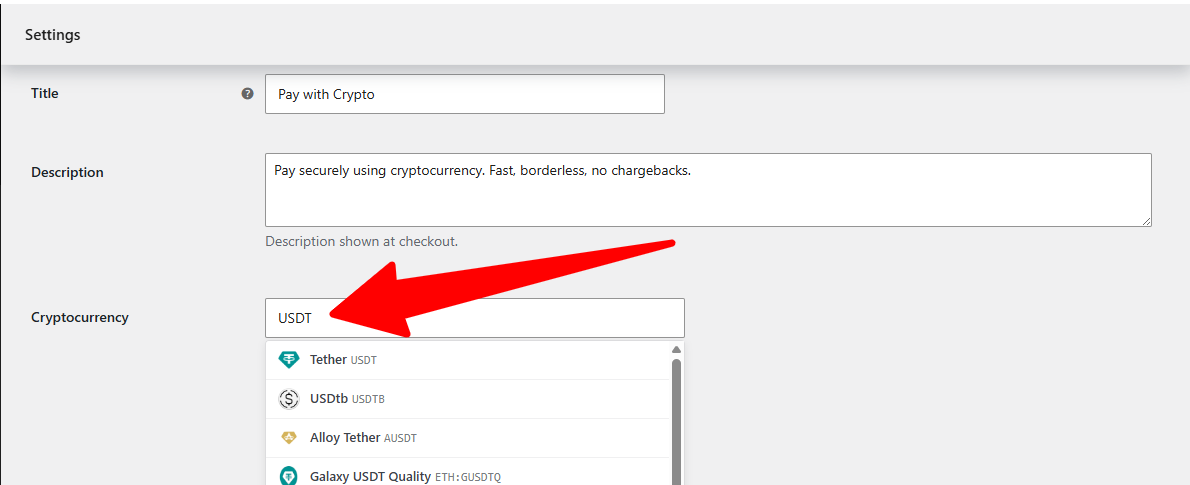
- 18,000+ Supported Cryptocurrencies — Search and choose from an extensive catalog of supported cryptocurrencies.
- Popular Cryptocurrencies Included — Bitcoin, Ethereum, USDT, stablecoins, and thousands more.
- Up to 3 Currencies, Free — Offer Bitcoin, Ethereum, USDT, or any three coins at once. Customers pick their preferred currency at checkout, and each one pays to its own wallet.
- Need More? — ChainCheckout Pro removes the limit with unlimited active cryptocurrencies.
🔑 WHY NON-CUSTODIAL MATTERS
When you accept cryptocurrency payments, one important question matters:
Who controls the funds?
With ChainCheckout, the answer is simple: you do.
Unlike custodial payment solutions that receive and hold funds on your behalf, ChainCheckout sends cryptocurrency payments directly into the wallet you own and control.
That means:
- You stay in control — Your cryptocurrency remains in your own wallet.
- No ChainCheckout account required — There is no external merchant account or dashboard required to receive payments.
- Direct wallet payments — Payments move directly from your customer to your configured wallet.
- Your payment process stays under your control — From checkout through payment confirmation.
If keeping ownership of your cryptocurrency matters to your business, a non-custodial payment gateway provides a simple and transparent approach.
✅ PERFECT FOR
ChainCheckout is designed for WooCommerce merchants who want to accept cryptocurrency payments while remaining in control of their funds.
Ideal for:
- Online stores selling physical products
- Digital product and software businesses
- Membership and course websites
- Freelancers and agencies
- Donation and fundraising websites
- Subscription and recurring service businesses
- Businesses serving customers who prefer cryptocurrency payments.
⚙️ HOW IT WORKS
- Install and activate ChainCheckout like any other WooCommerce payment gateway.
- Choose up to three cryptocurrencies and add the wallet where you want to receive each one.
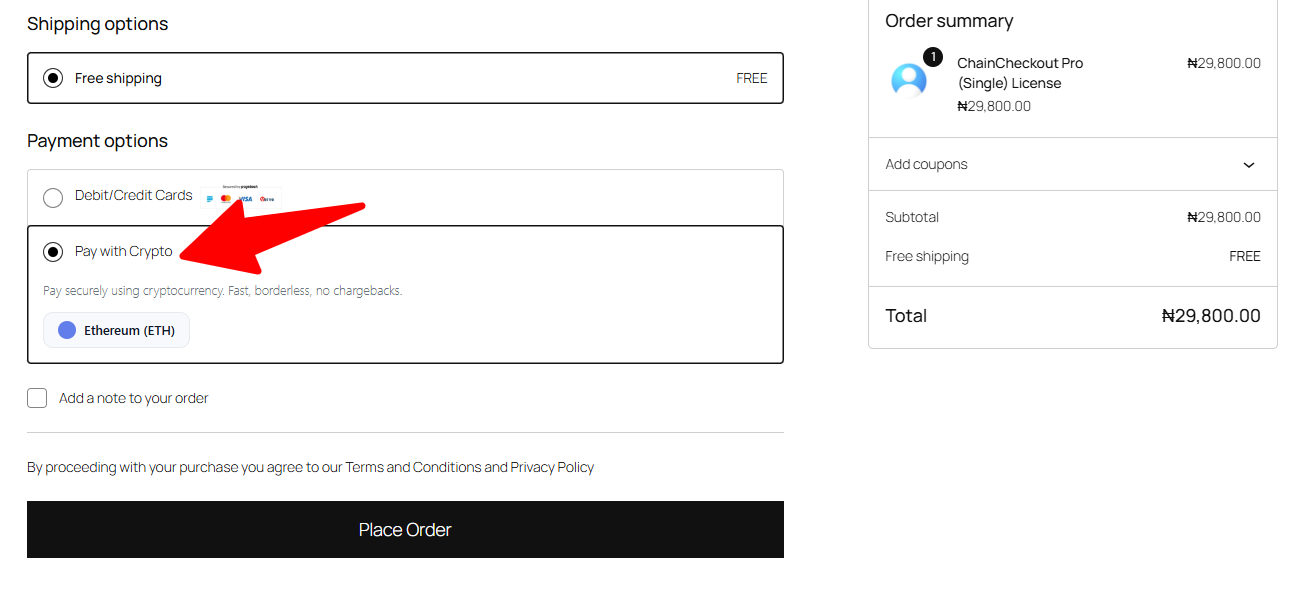
- Customers pick a currency, then pay using the provided wallet address and QR code during checkout.
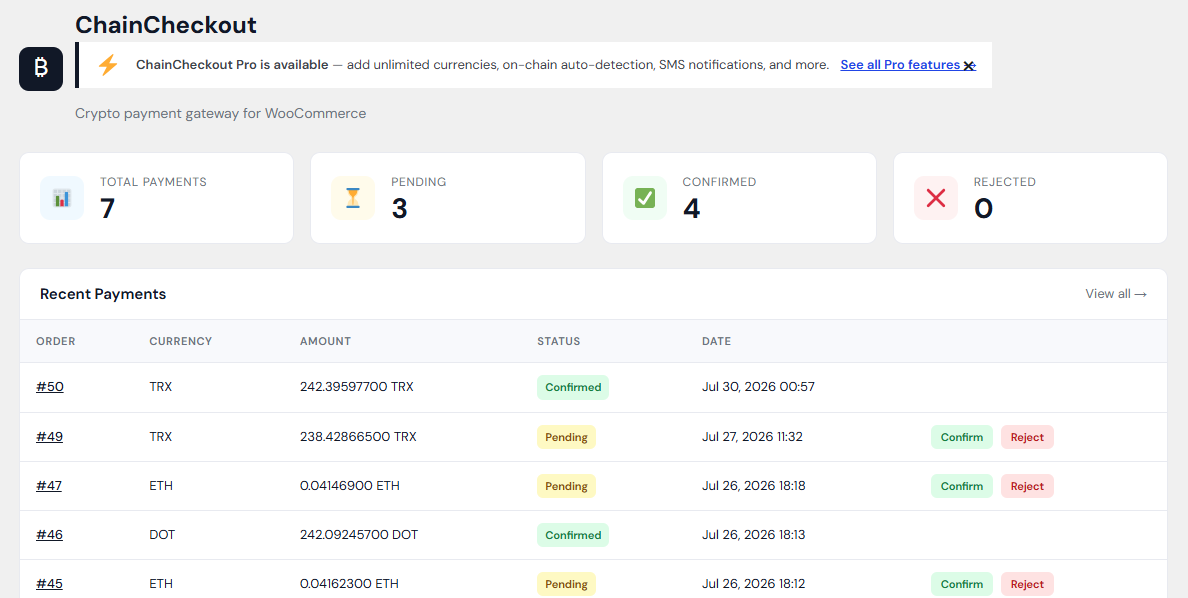
- Review and confirm payments from WooCommerce, or let ChainCheckout Pro automate on-chain payment confirmation.
⭐ WANT MORE? CHAINCHECKOUT PRO
Need more than three cryptocurrencies, or want to take manual review out of the picture?
ChainCheckout Pro adds:
- Unlimited active cryptocurrencies — Remove the 3-currency limit and offer as many cryptocurrencies as you like with the same checkout selector.
- Automatic on-chain payment confirmation — Automatically confirm orders when payment reaches your configured wallet.
- SMS payment notifications — Receive payment-related notifications by SMS.
- Recurring billing / subscription support — Accept cryptocurrency for recurring services and subscriptions.
Learn more about ChainCheckout Pro: https://jetlegz.com/chaincheckout/
🔗 THIRD-PARTY SERVICES USED
ChainCheckout integrates with trusted third-party services to provide live exchange rates and cryptocurrency search functionality.
CoinGecko (Primary)
API Documentation: https://www.coingecko.com/en/api
Terms: https://www.coingecko.com/en/terms
Used for:
- Live cryptocurrency exchange rates
- Cryptocurrency search (18,000+ supported cryptocurrencies)
Only the selected cryptocurrency symbol and your store currency are transmitted. No personal information or order data is sent.
Coinbase Exchange API (Fallback)
Documentation: https://docs.cloud.coinbase.com/exchange/docs
User Agreement: https://www.coinbase.com/legal/user_agreement
Used only if CoinGecko is temporarily unavailable to retrieve current exchange rates. No personal information or order data is transmitted.
Jetlegz email updates (Optional — off unless you opt in)
At the end of the setup wizard you can choose to subscribe to ChainCheckout product updates and offers. Nothing is sent unless you enter your email address, tick the consent box, and press “Subscribe and finish”. Skipping the step sends nothing, and the plugin works exactly the same either way.
If you subscribe, the following is sent once to jetlegz.com: your email address, this site’s URL, the plugin version, and the time you consented. You can unsubscribe at any time using the link in any email.
Privacy Policy: https://jetlegz.com/privacy-policy/
🔒 PRIVACY
Fonts (DM Sans and DM Mono, SIL Open Font License 1.1) are bundled with the plugin — nothing is loaded from Google or any other font CDN.
ChainCheckout is designed with privacy and merchant control in mind.
The plugin never takes custody of your cryptocurrency and does not require a ChainCheckout account to receive payments. External services are used only when necessary to retrieve live exchange rates and cryptocurrency information. The only other data ever sent is the optional email subscription described above, and only if you choose it.
For complete details, please see our Privacy Policy: https://jetlegz.com/privacy-policy/
📚 DOCUMENTATION
Comprehensive documentation is available to help you get started quickly and make the most of ChainCheckout, including installation, initial setup, wallet configuration, payment confirmation, troubleshooting, FAQs, and feature guides.
Documentation: https://jetlegz.com/documentation/chaincheckout/
🆘 SUPPORT
Need help? Whether you’re installing ChainCheckout for the first time or have questions about a feature, we’re here to help.
Support: https://jetlegz.com/support/
Email: info@jetlegz.com
Capturas


Instalación
- Upload the plugin files to the
/wp-content/plugins/chaincheckoutdirectory, or install ChainCheckout directly through the WordPress Plugins screen. - Activate ChainCheckout through the Plugins screen in WordPress.
- Follow the setup wizard that opens, or go to WooCommerce Settings Payments ChainCheckout.
- Choose up to three cryptocurrencies and enter the wallet address where you want to receive each one.
- Enable the payment gateway.
- Your customers can now begin paying with cryptocurrency directly into your wallet.
Preguntas frecuentes
-
Is ChainCheckout free?
-
Yes. The core ChainCheckout gateway is completely free, lets you accept up to three cryptocurrencies at once, and never charges transaction fees.
ChainCheckout Pro is an optional paid upgrade for merchants who want unlimited currencies, automatic on-chain confirmation, SMS notifications, and recurring billing.
-
What does the “Network” label next to my wallet address mean?
-
When you paste a wallet address, ChainCheckout checks its format and shows the network it belongs to, for example TRC-20 (TRON), Solana or Bitcoin (native SegWit). Some networks cannot be told apart from the address alone: an address starting with 0x looks identical on Ethereum, BNB Chain, Polygon and other EVM networks, so for tokens like USDT it is shown as “EVM (ERC-20 / BEP-20 / Polygon…)”. Make sure you only receive on the network you intend. This is a format check, not a guarantee the address is yours, so always double-check it. For addresses that could belong to several EVM networks you choose the one you receive on, and your customers are then shown that network at checkout and on the payment page.
-
Does ChainCheckout charge transaction fees?
-
No. ChainCheckout never charges transaction fees on your cryptocurrency sales.
As your business grows, more of your cryptocurrency revenue stays yours.
Note: the blockchain network itself may apply a small network (miner/gas) fee to process any cryptocurrency transaction. This fee is set by the network, not by ChainCheckout, and is standard for cryptocurrency transactions regardless of platform.
-
Where do cryptocurrency payments go?
-
Payments are sent directly into the wallet address you configure.
ChainCheckout never takes custody of your cryptocurrency and never routes payments through a ChainCheckout account.
-
Which wallets can I use to receive payments?
-
Any wallet address for the network you’ve selected works — a software wallet like MetaMask, a hardware wallet like Ledger or Trezor, or even a deposit address from an exchange account.
Just paste the address you want to receive payments at into the gateway settings.
-
Do I need a ChainCheckout account?
-
No. There is no registration, external dashboard, or merchant account required.
Simply install the plugin, configure your wallet, and start accepting cryptocurrency payments.
-
How are payments confirmed, and how long does it take?
-
The free version allows merchants to manually review and confirm submitted payments directly inside WooCommerce.
Timing depends on the confirmation speed of the blockchain network your customer paid on.
ChainCheckout Pro adds automated on-chain payment confirmation, automatically confirming orders once payment reaches your configured wallet and removing the manual step.
-
What happens if a customer needs a refund?
-
Cryptocurrency payments are irreversible once confirmed on the blockchain, so ChainCheckout cannot process refunds automatically.
If you want to offer refunds, you’ll need to send cryptocurrency back to your customer manually from your own wallet — we recommend collecting a return address from the customer as part of your refund process if this is something your store offers.
-
Can I accept more than one cryptocurrency?
-
Yes. The free version lets you accept up to three cryptocurrencies at the same time. Each one has its own wallet address, and customers choose which to pay with at checkout.
ChainCheckout Pro removes the limit and allows unlimited active cryptocurrencies.
-
Which cryptocurrencies are supported?
-
Search and choose from more than 18,000 supported cryptocurrencies, including Bitcoin, Ethereum, USDT, stablecoins, and thousands more.
-
Does ChainCheckout verify wallet addresses?
-
Where supported, ChainCheckout checks that the wallet address you enter matches the correct format for the selected blockchain network before you save it, helping catch typos and malformed addresses early.
For cryptocurrencies whose formats cannot yet be automatically checked, the plugin clearly lets you know so you can double-check before accepting payments.
-
Does ChainCheckout support WooCommerce Blocks?
-
Yes. ChainCheckout supports both the classic WooCommerce checkout and WooCommerce Cart & Checkout Blocks.
-
Where can I find documentation and support?
-
Documentation: https://jetlegz.com/documentation/chaincheckout/
Support: https://jetlegz.com/support/You can also use the Support tab on the WordPress.org plugin page.
Comentarios
Non hai recensións para este plugin.
Colaboradores e desenvolvedores
“ChainCheckout – Crypto Payment Gateway for WooCommerce” é un software de código aberto. As seguintes persoas colaboraron con este plugin.
Colaboradores
Traduce “ChainCheckout – Crypto Payment Gateway for WooCommerce” ao teu idioma.
Interesado no desenvolvemento?
Revisa o código, bota unha ollada aorepositorio SVN, ou subscríbete ao log de desenvolvemento por RSS.
Rexistro de cambios
1.1.3
- New: accept up to three cryptocurrencies at the same time, each with its own wallet address, with a currency picker available at both the classic WooCommerce checkout and WooCommerce Cart & Checkout Blocks.
- New: guided setup wizard for choosing cryptocurrencies and configuring receiving wallets, with an optional email updates sign-up at the end of setup.
- New: customers are now clearly told which network to send their payment on. The network appears on the checkout payment panel, WooCommerce Blocks checkout, order-received page and admin Payments list, with a warning that funds sent on a different network cannot be recovered.
- New: when a wallet address could belong to several EVM networks, such as USDT or USDC on an 0x address, merchants can choose the network they receive on, including Ethereum, BNB Smart Chain, Polygon, Arbitrum One, Optimism, Base and Avalanche C-Chain.
- New: Bitcoin, TRON, Solana, XRP Ledger and similar networks can be identified automatically from the wallet address where supported.
- Improved: wallet address checks now show the detected network as soon as an address is pasted, including examples such as TRC-20 (TRON), Bitcoin (native SegWit) and Solana.
- Improved: merchants are warned when a pasted wallet address appears to belong to a different network than the selected cryptocurrency.
- Fixed: USDT and USDC wallet addresses on TRON or Solana were incorrectly rejected and are now accepted.
- Fixed: optional currencies in the setup wizard can now always be removed, even before a cryptocurrency has been selected.
- Fixed: the setup wizard could appear unstyled after an update when an old stylesheet was served from browser, CDN or host cache. Wizard styles are now built into the page, and other plugin CSS and JavaScript files receive a new address whenever they change.
- Fixed: the setup wizard no longer appears broken when another plugin outputs a notice or stray content before the page.
- Improved: the setup wizard explains the free three-currency limit and what ChainCheckout Pro adds.
- Improved: exchange-rate quotes now follow the cryptocurrency selected by the customer.
- Improved: fonts are bundled with the plugin instead of being loaded from Google’s servers.
- New: dismissible setup reminders and an occasional dismissible review request after several confirmed payments.
- Improved: compatibility testing through WordPress 7.1 and plugin documentation.
- Existing single-currency setups continue to work unchanged.
1.0.1
- Updated compatibility testing through WordPress 7.1.
- Improved plugin listing and documentation.
1.0.0
- Initial release.