
Descrición
Adminify Activity Logs: Free WordPress User Activity Log
Adminify Activity Logs records every change made inside the WordPress dashboard. Who did what, when, and from which IP. Built for site owners and agencies who want a clean audit trail without paying for a premium tier or installing a heavy security suite. Everything in this readme is in the free plugin. No locked filters, no upsell modal, no nag screens.
➡️ Explore More | 📖 Documentation | 💬 Support
Why run a WordPress activity log
If you don’t know who deactivated that plugin or deleted that post, you can’t tell a mistake from a security incident. Activity logs answer who-did-what-when. Any WordPress site with more than one person in the dashboard eventually needs one. Agency builds, membership sites, and multi-author blogs all run into the same problem: someone made a change, nobody owns up, and you spend an afternoon working out what happened. An audit trail saves that afternoon.
What Adminify Activity Logs does that the others don’t
- Free with no Pro tier upsell: Every filter, every retention setting, and every detail view ships in the free plugin. Other activity log plugins lock IP tracking or longer retention behind a paid plan.
- Real-time logging: Activities appear in the log as soon as they happen. No cron, no batch delay.
- IP address tracking: Each entry records the source IP. Useful when you’re investigating a login or a change you didn’t expect.
- Time, role, user, component, and action filters: Narrow the log by time frame (today, yesterday, week, month), user role, specific user, WordPress component (Post, Plugin, Theme, etc.), or action type (Updated, Deleted, Activated).
- Configurable retention: Default is 30 days. Bump it up if you need a longer compliance window. Bring it down if database size is tight.
- Searchable records: Find a specific change by user, action, or keyword without scrolling.
- Multisite compatible: Works across WordPress network installations.
- Built by Pixar Labs: Same team that ships WP Adminify, Admin Bar Editor, Master Addons, and Loginfy.
Detailed Feature Breakdown
What gets logged for every entry
- Date: Timestamp when the action happened.
- Author: Username of the person who did it.
- IP Address: Source IP for location tracking.
- Type: Category of the action (post update, plugin installation, etc.).
- Label: Short description of the activity.
- Action: Specific operation (edited, deleted, added, etc.).
- Description: Detailed explanation of the activity.
- Delete control: Remove individual log entries with one click.
Time-frame filters
- All time
- Today
- Yesterday
- Week
- Month
Role-based filters
View activities by user role: Administrator, Editor, Author, Contributor, Subscriber, Customer, Shop Manager, Guest, plus any custom roles registered on the site.
User filters
- All users
- Specific users (select individual users to track)
Component filters
Track activities tied to specific WordPress components:
- Attachments
- Comments
- Options
- Plugin
- Post
- Taxonomy
- Theme
- User
Action types tracked
- Activated
- Added
- Approved
- Created
- Deactivated
- Deleted
- Installed
- Trashed
- Unapproved
- Updated
Configuration options
- Data Retention: Adjust the “Data Store for” value (default 30 days).
- Search & Filter: Filter logs by user, action, or keyword via the search bar.
Common use cases
- Security investigation: Spot unauthorized access attempts and unusual activity.
- Accountability: Know who did what and when across the site.
- Troubleshooting: Trace recent changes when something breaks.
- Compliance: Keep an audit trail for regulatory requirements (GDPR, HIPAA, internal policy).
- Team transparency: Track contributions across multi-author sites.
- Disaster recovery: See what changed in the hours before a problem occurred.
⚡ Upgrade to Adminify Pro to get the full Adminify Pro suite. 60+ admin customization features beyond activity logging: white labeling, menu editor, dashboard widgets, login customizer.
Capturas
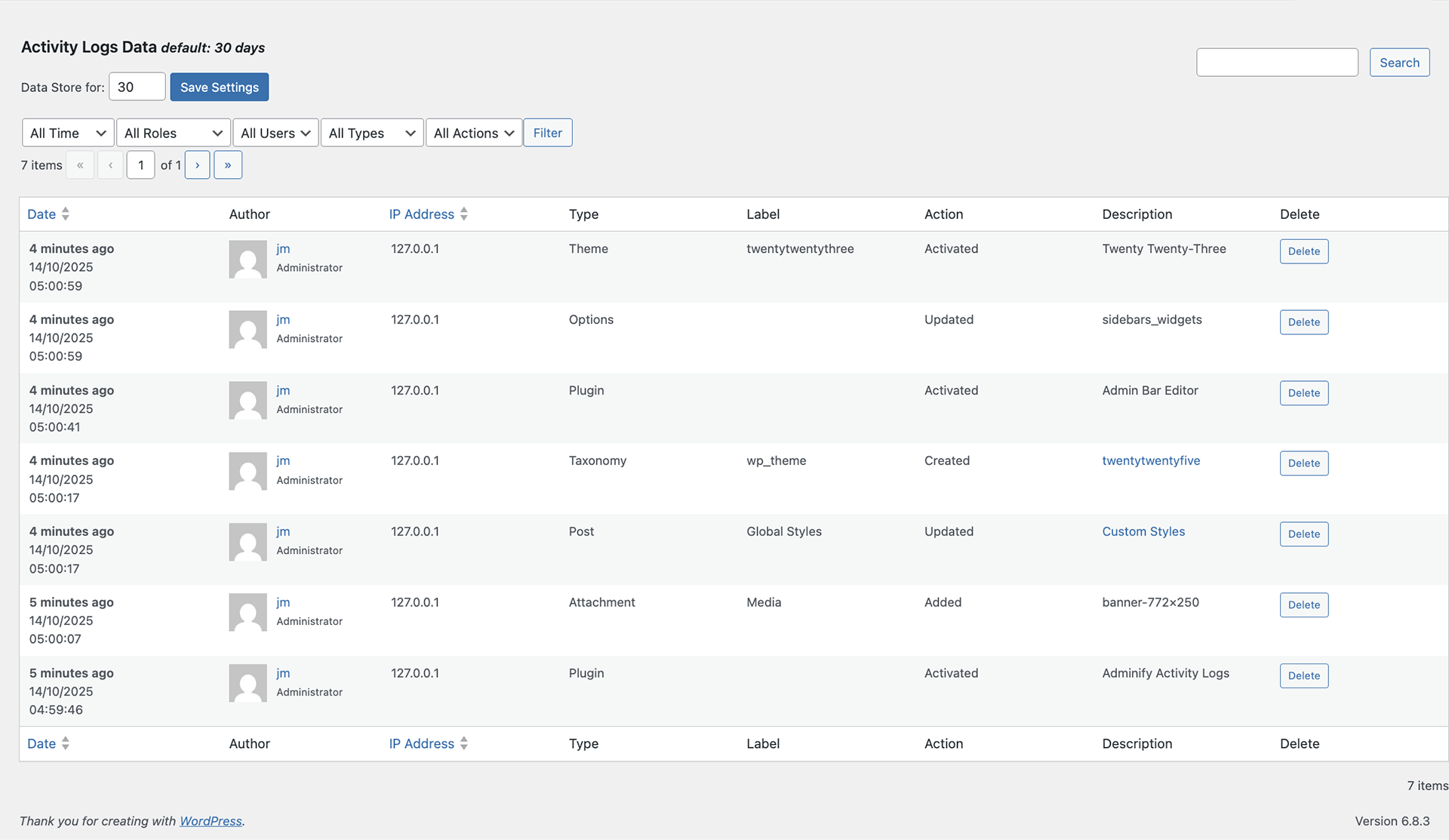
Activity Logs dashboard showing the full event timeline. 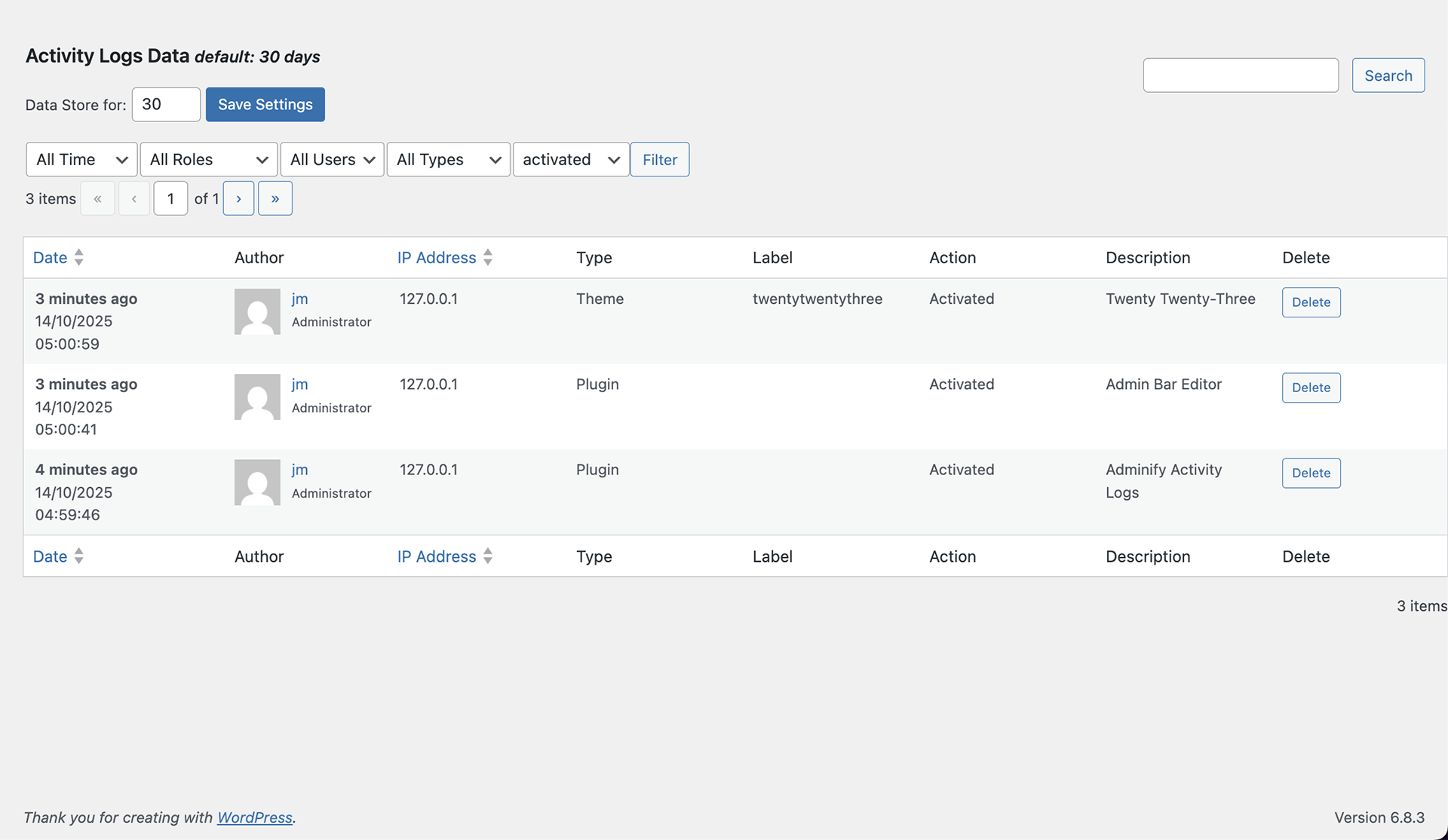
Filter controls for time, role, user, component, and action type.
Instalación
Automatic installation (recommended)
- Log in to your WordPress dashboard.
- Navigate to
Plugins > Add New. - Search for “Adminify Activity Logs”.
- Install the plugin developed by Pixar Labs.
- Click Activate.
Manual installation
- Download the
adminify-activity-logsplugin ZIP from WordPress.org. - In your dashboard, go to
Plugins > Add New > Upload Plugin. - Upload the ZIP file and click Install Now.
- After installation, click Activate Plugin.
Getting started
- After activation, open Activity Logs in the WordPress dashboard menu.
- The log starts populating immediately. No setup needed.
- Use the filters at the top of the log table to narrow by time, role, user, component, or action.
- Open the plugin settings to adjust the data retention period.
Preguntas frecuentes
-
What does Adminify Activity Logs track?
-
Every change made inside the WordPress dashboard: post updates, plugin installs, theme changes, user logins, settings changes, taxonomy edits, attachment uploads, comments, and option changes. Each entry records the user, the action, the IP address, and a description.
-
Will this plugin slow down my site?
-
No. Adminify Activity Logs only runs in the WordPress admin area. It doesn’t load on frontend page views, so visitor page speed isn’t affected.
-
How long are activity logs stored?
-
Default retention is 30 days. Adjust it in the plugin’s settings panel. Longer if you need a bigger compliance window. Shorter if database size is tight.
-
Can I export the activity logs?
-
Not yet. The current version doesn’t ship a built-in export button. You can copy the log table contents into a spreadsheet manually if needed.
-
Does it track frontend visitor activity?
-
No. Adminify Activity Logs only tracks actions inside the WordPress dashboard (the admin area). It doesn’t log frontend visitor browsing.
-
Will it track activities from all users?
-
Yes. The plugin records actions from all registered users who do anything in the WordPress dashboard, regardless of role.
-
Can I get notified when specific actions occur?
-
Not yet. Notifications aren’t in the current version. Check the log periodically using the search and filter controls to find specific actions.
-
Is there a limit to how many actions it can track?
-
No. There’s no cap on the number of logged actions. Entries older than your retention setting get cleaned up automatically to keep the database size in check.
-
Is this plugin really free?
-
Yes. Every feature listed in this readme is in the free version. There’s no premium tier for Adminify Activity Logs as a standalone plugin. If you want broader admin customization (white labeling, menu editor, dashboard widgets, login customizer), look at the full Adminify plugin.
-
Does it work on WordPress multisite?
-
Yes. The plugin is compatible with WordPress network installations.
-
Where do I report security bugs found in this plugin?
-
Please report security bugs found in the source code of the undefined plugin through the Patchstack Vulnerability Disclosure Program. The Patchstack team will assist you with verification, CVE assignment, and notify the developers of this plugin.
Comentarios
Non hai recensións para este plugin.
Colaboradores e desenvolvedores
“Adminify Activity Log & Audit Trail” é un software de código aberto. As seguintes persoas colaboraron con este plugin.
Colaboradores

Traduce “Adminify Activity Log & Audit Trail” ao teu idioma.
Interesado no desenvolvemento?
Revisa o código, bota unha ollada aorepositorio SVN, ou subscríbete ao log de desenvolvemento por RSS.
Rexistro de cambios
1.0.9 (21-05-2026)
Updated: Plugin Title Update
1.0.8 (21-05-2026)
Added: Recommended suggest plugins options added.
Updated: Performance Improved.
Updated: WordPress 7.0 compatibility checked
1.0.7 (05-02-2026)
- Fixed: URL routing conflict with the Loginfy plugin resolved.
1.0.6 (12-10-2025)
- Fixed: Class missing fatal error resolved.