

Descrición
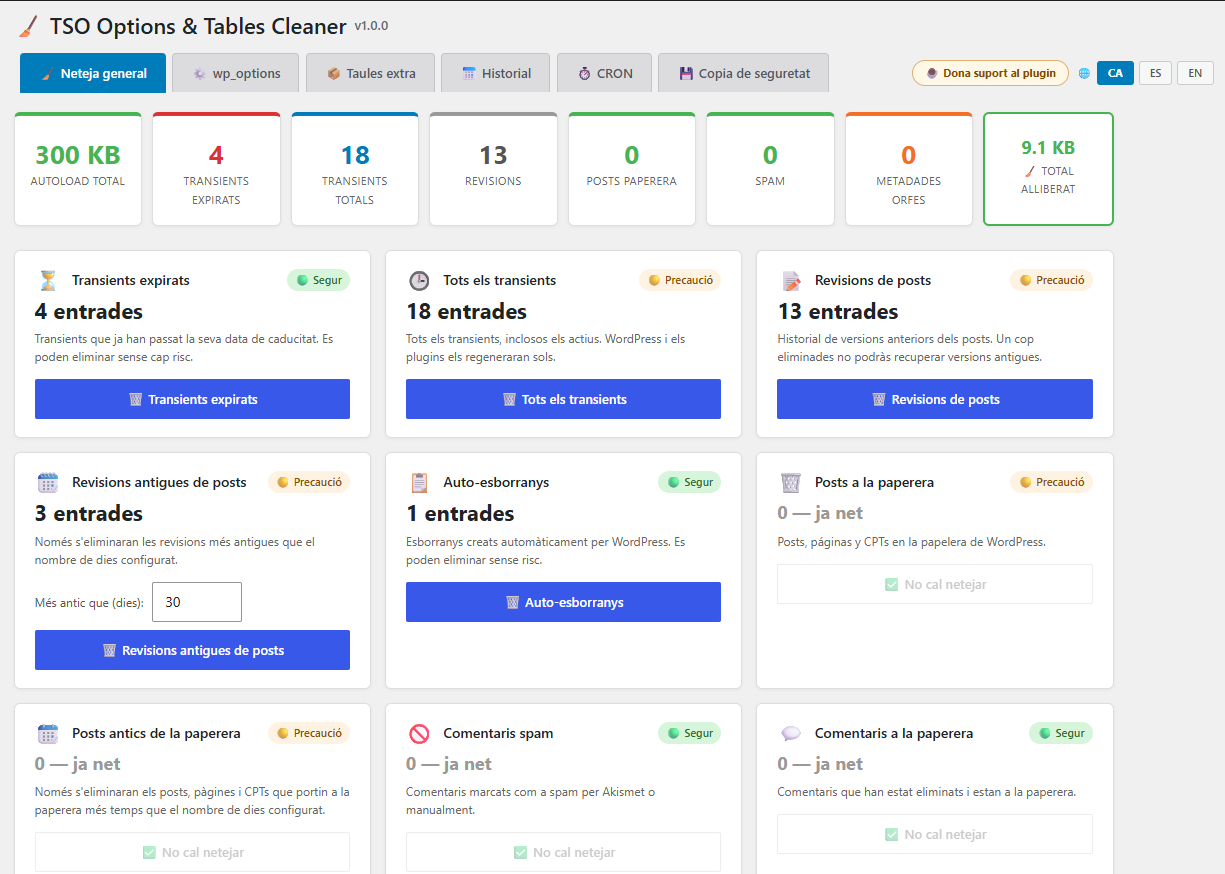
TSO Options & Tables Cleaner is a database maintenance plugin for WordPress. It helps you clean wp_options, orphan metadata, revisions, and leftover plugin tables, with backups and table optimization.
Features:
- General cleanup — Remove expired transients, post revisions, auto-drafts, trashed posts and comments, orphan post/comment/user/term metadata
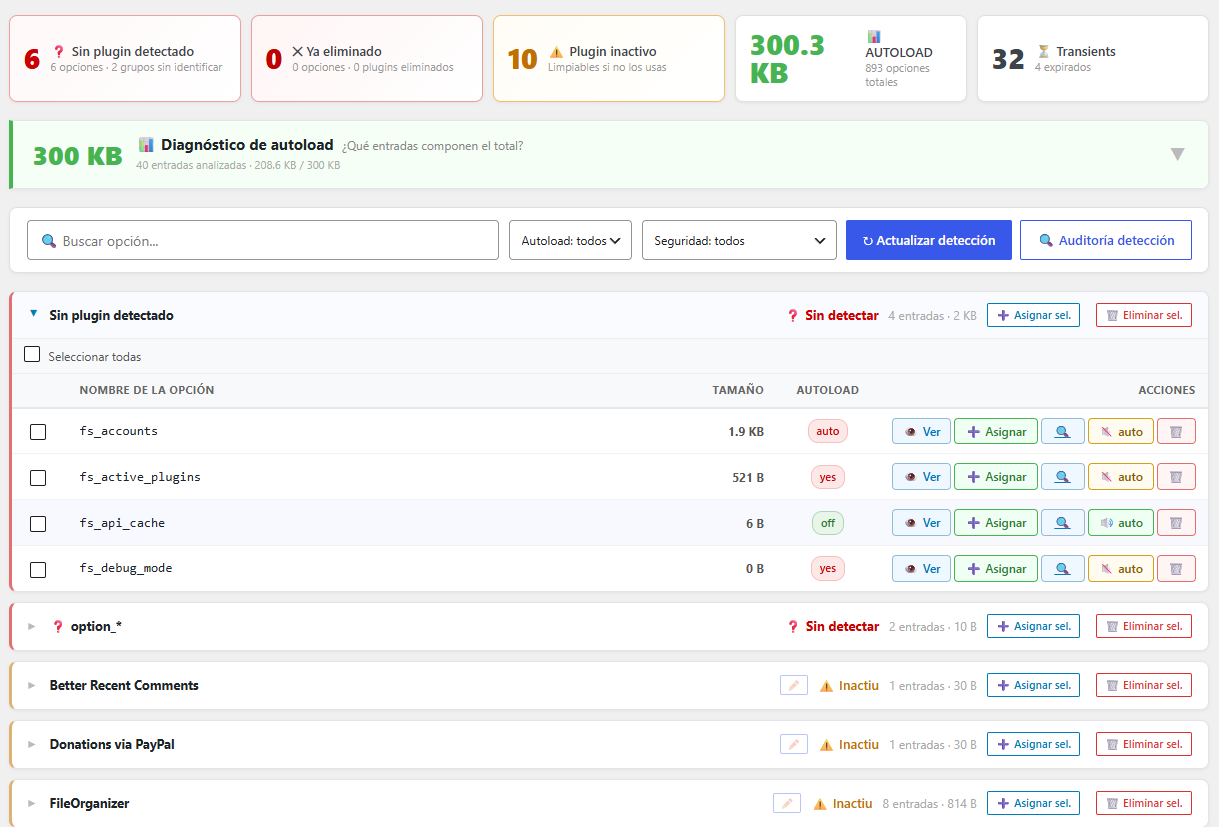
- wp_options manager — Browse, search and delete orphan options grouped by plugin, with autoload management and plugin detection for 300+ known plugins
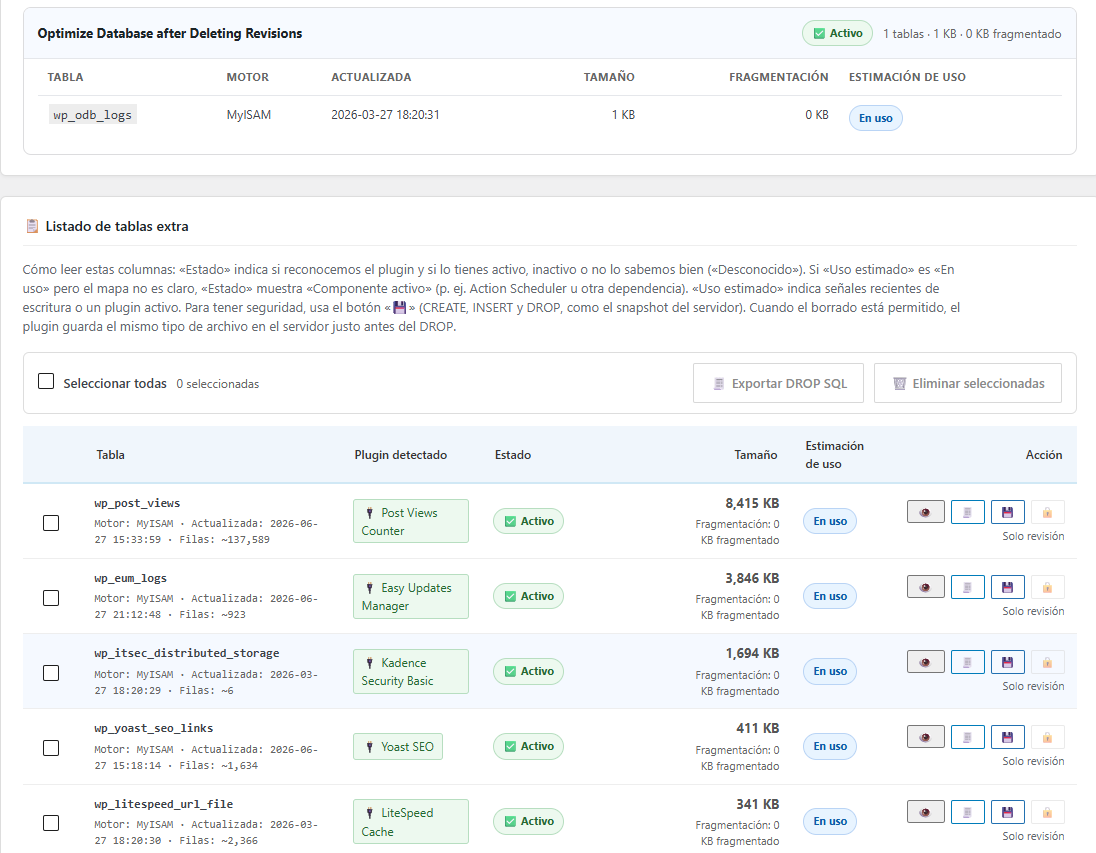
- Extra tables — Detect and remove tables left by uninstalled plugins (see detection limitations below)
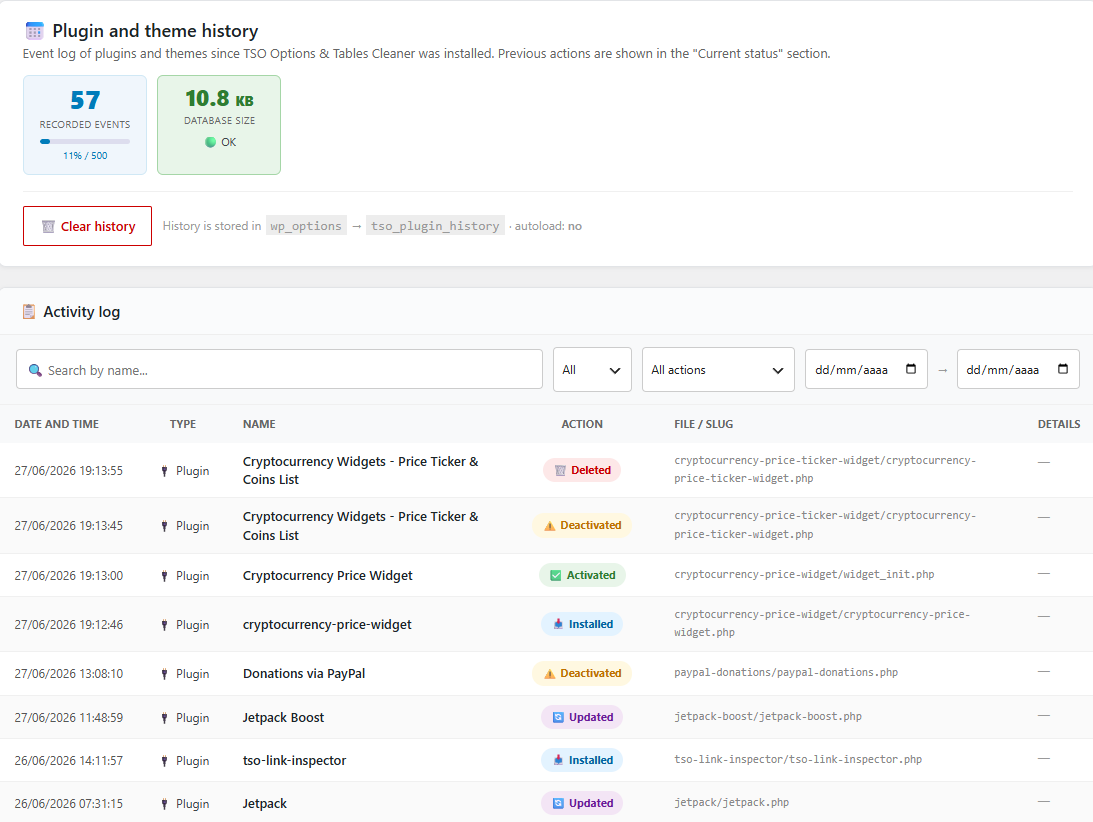
- Plugin & theme history — Track installation, activation, deactivation and deletion events for plugins and themes
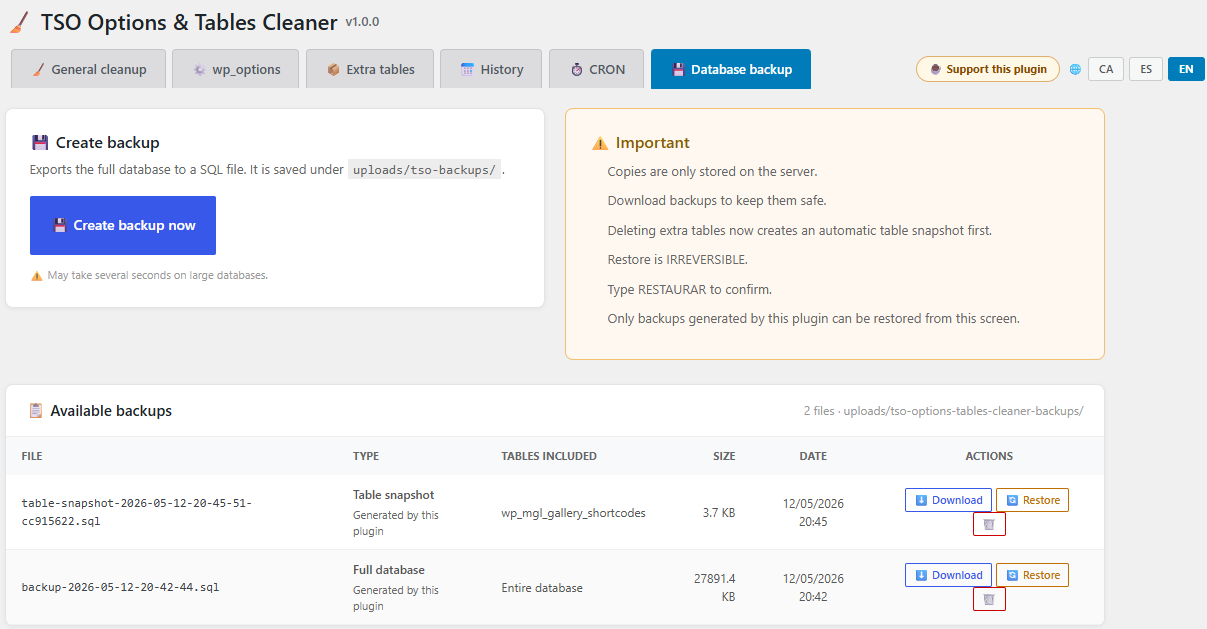
- Database backup — Export the full database to SQL, download, restore or delete backups stored in wp-content/uploads/tso-options-tables-cleaner/backups/
- Table optimizer — Run OPTIMIZE TABLE on all fragmented WordPress tables
- Interface languages — Catalan, Spanish and English UI with per-user language preference
- Cache-plugin compatible — Compatible with LiteSpeed Cache and other caching plugins
Detection is heuristic, not perfect
WordPress does not record which database table belongs to which plugin. TSO Options & Tables Cleaner infers ownership from table prefixes, plugin folders on disk, install history, and other signals. That works well for many sites, but it cannot be 100% accurate in every case.
You may occasionally see:
- A table marked as probably orphaned while the plugin is still installed or active (false positive)
- A leftover table not flagged as orphaned after uninstall (false negative)
- Recent activity on a table because MySQL metadata was updated (maintenance, repair, or unreliable timestamps on some engines) even though the plugin is gone
- Unclear ownership for shared prefixes, renamed plugin folders, or custom tables
The plugin is intentionally conservative: when confidence is low, delete actions are blocked and you will see Review only. Always check the plugin list, export SQL before dropping tables, and use manual assignment when the automatic label looks wrong. Never delete a table unless you are sure it is safe for your site.
Privacy Policy
TSO Options & Tables Cleaner does not collect, transmit, or share any personal data with external services.
Data stored locally:
- Language preference: The administrator’s chosen UI language (Catalan, Spanish or English) is stored in wp_usermeta under the key tso_ui_lang. This data stays on your server and is never transmitted anywhere.
- Plugin/theme history: A log of plugin and theme events is stored in wp_options under the key tso_plugin_history. This log is optional and can be cleared at any time from the History tab.
- Database backups: SQL backup files are stored locally in wp-content/uploads/tso-options-tables-cleaner/backups/ and are never uploaded to any external service.
No external connections: This plugin does not make any HTTP requests to external servers, does not use analytics, and does not track usage of any kind.
Capturas
Instalación
- Upload the plugin folder to /wp-content/plugins/
- Activate the plugin through the Plugins screen in WordPress
- Go to Tools > TSO Options & Tables Cleaner to start cleaning
Preguntas frecuentes
-
Is it safe to delete options from inactive plugins?
-
Yes. Options from inactive plugins can be deleted safely. The plugin marks active plugin options with a warning so you can identify them.
-
Is plugin and table detection always accurate?
-
No. Detection is heuristic. WordPress does not store a definitive link between each table or option and its plugin. TSO uses prefixes, folder names, history, and other clues. Results are usually helpful, but false positives and false negatives can happen — especially after plugin renames, shared prefixes, stale maps, or unusual custom setups.
-
Why does a table show as orphaned when the plugin is still active?
-
Usually because automatic detection matched an outdated path, a label-only prefix map, or conflicting signals. Reload the Extra tables tab after plugin updates. If the label is wrong, use Assign to link the table to the correct plugin, or export SQL and review before deleting anything.
-
Why is delete blocked for a table that looks orphaned?
-
Delete is allowed only when status and usage signals both look safe. If MySQL reports recent writes, the plugin folder still exists but is inactive, or ownership is uncertain, the UI shows Review only to reduce the risk of dropping a table still in use. Export the SQL backup and verify manually when in doubt.
-
Where are the backups stored?
-
In wp-content/uploads/tso-options-tables-cleaner/backups/. This directory is protected by .htaccess and an index.php to prevent direct access. Files are stored locally and never transmitted to any external service.
-
Does it work with LiteSpeed Cache?
-
Yes. The plugin sends the appropriate no-cache headers and LiteSpeed Cache API calls to avoid caching the admin interface.
-
What data does this plugin store?
-
Only the administrator interface language preference (Catalan, Spanish or English), saved as user meta (tso_ui_lang). No data is sent to external servers.
Comentarios
Non hai recensións para este plugin.
Colaboradores e desenvolvedores
“TSO Options & Tables Cleaner” é un software de código aberto. As seguintes persoas colaboraron con este plugin.
Colaboradores
Traduce “TSO Options & Tables Cleaner” ao teu idioma.
Interesado no desenvolvemento?
Revisa o código, bota unha ollada aorepositorio SVN, ou subscríbete ao log de desenvolvemento por RSS.
Rexistro de cambios
Recent releases only. Older notes (1.2.0 through 1.0.0) are in changelog.txt in the plugin folder.
1.3.0
- Safety: WordPress core options are locked in the UI and every delete handler
- Detection V2 is the default (candidates, score, margin); evidence merges by owner to cut false Unconfirmed rows
- Widgets: manual assignment and plugin_disk/history detection move rows out of the shared Widgets bucket; theme groups resolve to wp-content/themes/
- Extra tables: activation snapshots, schema signatures (WPForms, Gravity Forms, Rank Math, WooCommerce, etc.), sibling propagation and candidate UI
- Options tab groups by owner token; audit panel shows evidence and uncertain-row filter; History records tables_mapped with source
- Hosting stacks (Freemius, Softaculous, WP Toolkit) show a warning but stay manually deletable
1.2.7
- Detection audit: theme vs plugin on-disk checks, synthetic hosting/SDK labels, group-flag mismatch detection, mixed-sample normalization
- Detection: theme_mods_* never remapped to plugins via codescan; theme path hints under wp-content/themes
- History: malformed rows filtered, safer upgrader slug resolution, Softaculous keys excluded from history index
- Extra tables: WordPress core / multisite protected tables excluded; quoted DROP identifiers
- General cleanup: expired transients savings fix, retention_days partial save, multisite OPTIMIZE scope
- Backup: reliable delete check, uploads protection files, unique filenames, cache flush after restore
- Softaculous / hosting options (softaculous_*, ai-install) stay in their own group — never merged into WP plugins
- Options tab: Active/Inactive group status reconciled from live plugin inventory after merge
- Options-tab cache: avoid duplicate delete_option calls after flush; fix inv_sig / cache-blob storage keys (schema 7)
- AJAX/admin: POST reads via storage helpers; retention_days isset preserved after helper migration
- Tested up to WordPress 7.1; Plugin Check PHPCS on DROP TABLE queries
1.2.5
- History Details: version, folder, bootstrap path, and automatic “replaces” hint when a recently deleted plugin shares the same option-prefix family
- History: show mapped_on_delete for theme keys_mapped events; enrich older rows on display
- Detection: shared prefixes (e.g. tsosk_) resolve to the currently installed plugin folder without manual aliases
- Backup tab: select and delete multiple backups in bulk
- Storage: validated admin POST helper for bulk backup filenames (Plugin Check / PHPCS)