

Descrición
Stop WordPress account takeover before it starts.
Stolen passwords. Hijacked sessions. Brute-force bots hammering login pages around the clock. Most WordPress breaches don’t break the lock — they steal the key. Defentry adds a second door: device-based login verification for WordPress.
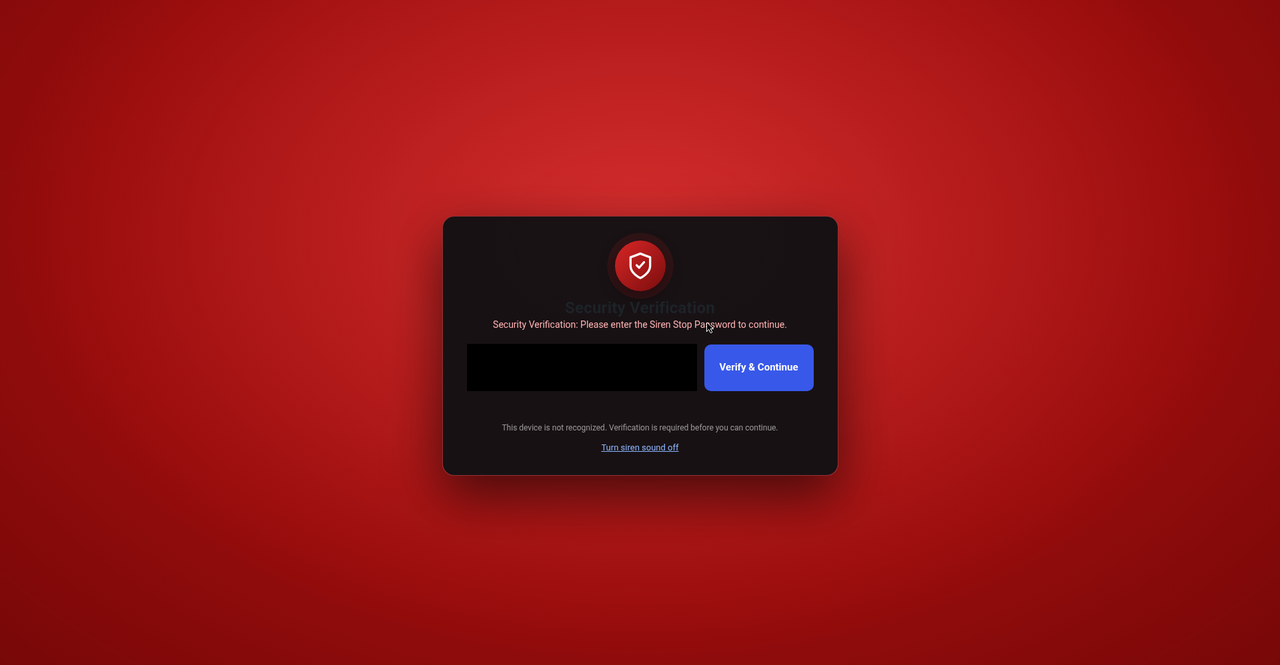
When an administrator, editor, or author signs in from a new, unrecognized device, Defentry instantly covers the dashboard with a full-screen verification overlay and siren until a secret stop password is entered. At the same moment, every other logged-in user sees a real-time login alert banner and hears the siren — so a hijacked session can never slip by silently.
Defentry combines three proven layers of WordPress login protection in one lightweight plugin: limit login attempts with automatic IP lockouts to stop brute-force attacks on wp-login.php, trusted-device verification that defeats stolen passwords, and instant login alerts so your team sees every new device the second it appears.
How it works
- A privileged user logs in from a device Defentry has never seen.
- The dashboard is immediately blocked by the stop-password overlay (with optional siren).
- All other logged-in users get an instant alert banner with one-click Trust, Mute, and Master Admin actions.
- The correct stop password verifies and permanently trusts the device. Wrong guesses are rate-limited per IP — 3 strikes triggers a temporary IP block. Verification is enforced server-side: an unverified device receives only the verification page — no dashboard screens, AJAX actions, or form submissions run until it passes.
Login security features
- New-device verification overlay — unrecognized devices cannot touch wp-admin until the stop password is entered
- Brute-force IP protection — 3 wrong password attempts means a temporary IP block. Detection uses
REMOTE_ADDRonly, so attackers can’t dodge it by spoofingX-Forwarded-Forheaders - Login attempt limiting — failed wp-login attempts are counted per IP; after 5 failures (configurable) the IP is locked out and even the correct password is rejected until the lockout expires. Optional escalating lockouts, an IP whitelist, and a Master Admin email on every lockout
- Login activity by IP — every login attempt, successful or failed, is counted per IP address for the last 30 days: see exactly how many requests each IP made, which usernames it tried, and block or whitelist it in one click
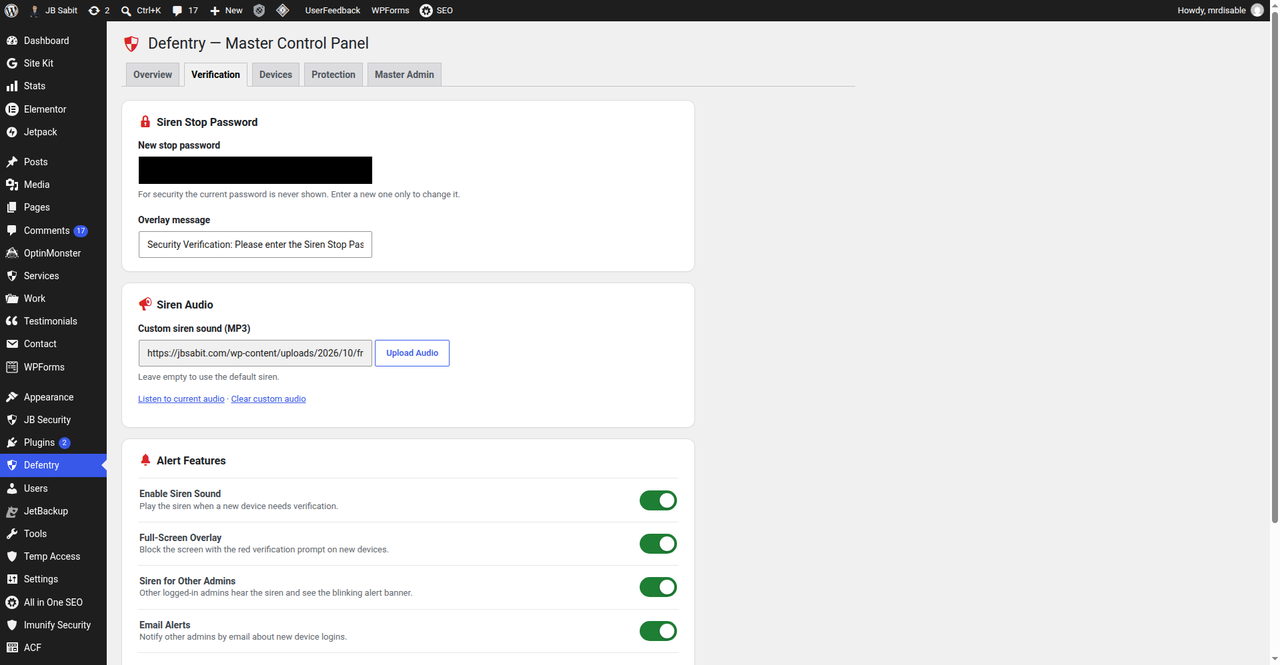
- Siren + broadcast login alerts — an audible siren and alert banner notify every logged-in user the second a new device appears; custom MP3 siren supported, one-click mute
- Master Admin control — one designated administrator owns the security settings and can instantly block suspicious users (blocked users are logged out on the spot)
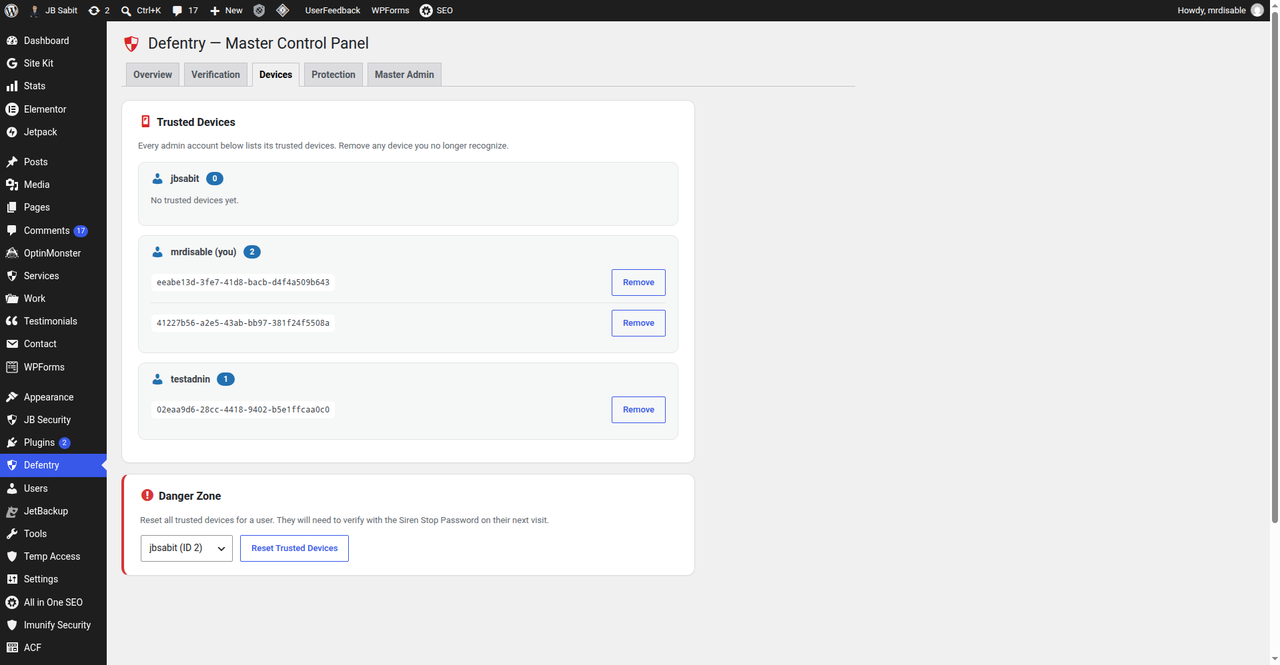
- Trusted device management — view, trust, rename, renew, and remove devices per user, or reset all devices at once. Devices can optionally expire after 30, 90, or 180 days and are auto-named from the browser (e.g. “Chrome · Windows”)
- New-device email alerts — administrators, editors, and authors are emailed once per new device with user, time, IP, and device details
- Hardened admin pages — sends
X-Frame-Options,X-Content-Type-Options, andReferrer-Policyheaders on admin screens
Perfect for
- Agencies and freelancers managing client WordPress sites
- WooCommerce stores and membership sites with multiple staff accounts
- Bloggers and businesses who want to know the instant an unknown device touches their dashboard
Built like a security tool should be
- The stop password is hashed with
wp_hash_password()and verified server-side only — never stored in plaintext, never shown in settings, never exposed to the browser - Nonce-protected AJAX, capability checks on every action, sanitized inputs and escaped outputs throughout
- No tracking, no upsells, no bloat — 100% free under the GPL, forever
Defentry is one strong layer of WordPress login security. Pair it with two-factor authentication and a firewall for defense in depth.
Links: Support forum · Author website
Built by WordPress security specialist Md Jahid Bin Sabit.
Credits
Defentry is designed, built, and maintained by Md Jahid Bin Sabit — WordPress security specialist.
- Website: https://jbsabit.com/
- WordPress.org profile: https://profiles.wordpress.org/jbsabit/
- Contributor: Reflecters — https://profiles.wordpress.org/wearereflecters/
Capturas
Instalación
- Upload the plugin files to
/wp-content/plugins/defentry/, or install through the WordPress plugins screen. - Activate the plugin.
- A notice will prompt an administrator to select the Master Admin. Pick one and save.
- Open the Defentry menu, set a siren stop password (there is no default — verification stays off until you set one), and turn Status ON.
- Done. Logins from new devices will now trigger verification.
Preguntas frecuentes
-
What happens when someone logs in from a new device?
-
When an administrator, editor, or author logs in from a device Defentry has never seen, the WordPress dashboard is covered by a full-screen overlay asking for the siren stop password — optionally with a siren sound. Every other logged-in user simultaneously sees a red alert banner (“New device login detected”) with buttons to trust the device, mute the siren, or take Master Admin action.
-
How do I trust / verify a new device?
-
Enter the correct siren stop password on the new device and it is trusted permanently. The Master Admin can also trust any device for any user from the alert banner or from Defentry Manage Trusted Devices.
-
Who can block or unblock users?
-
Only the Master Admin — the one administrator designated in the Defentry settings. This keeps emergency response in a single accountable hand.
-
What exactly does blocking a user do?
-
The user is added to the blocklist. On their next dashboard visit they are logged out immediately with a notice, and they cannot use wp-admin again until the Master Admin unblocks them from Defentry Manage Blocked Users.
-
I don’t hear the siren. Why?
-
Browsers block audio until you interact with the page (click, scroll, or press a key). The siren starts after your first interaction. You can mute it at any time from the alert banner, or disable/replace it in the Defentry settings.
-
Can I change the siren sound or turn it off?
-
Yes. In the Defentry settings you can enable or disable the siren and upload your own MP3. Leave the upload empty to use the built-in siren.
-
Which user roles are protected?
-
Administrators, editors, and authors. Contributors, subscribers, and customers are never interrupted.
-
I forgot the stop password. How do I get back in?
-
An administrator with database access can delete the
scbr_settingsrow from thewp_optionstable — the plugin then resets with protection OFF and no stop password set, so you can set a new password. Alternatively, temporarily rename the plugin folder via FTP/cPanel to disable it, then set a new stop password in the settings. -
No — clearing the cookie generates a brand-new random device ID, which is untrusted by definition, so the overlay appears again. The system fails closed.
-
Does Defentry replace two-factor authentication (2FA)?
-
No. Device verification and 2FA stop different attacks — a stolen password alone is useless against Defentry, and a stolen device alone is useless against 2FA. Use both.
-
Will Defentry slow down my website?
-
No. Its scripts and styles load only on wp-admin pages, and only when needed. Visitors to your public site are completely unaffected, and the plugin makes no external HTTP requests.
-
Does it work with caching plugins or Cloudflare?
-
Yes. Verification happens inside wp-admin, which caching plugins and CDNs don’t cache. One honest note: IP-based attempt limiting reads
REMOTE_ADDR; behind a reverse proxy or CDN (like Cloudflare) all visitors may share the proxy’s IP, so an IP block applies proxy-wide. Device verification itself is unaffected. -
Is Defentry compatible with multisite?
-
Settings are stored per site, not network-wide, and multisite has not been officially tested. It should work per-site; network-wide management isn’t included.
-
What data does Defentry store? Is it private?
-
Random device IDs (in a browser cookie and per-user metadata), device details (name, trust/expiry dates, last seen), plugin settings (in
wp_options), per-IP login attempt counts (kept for 30 days, on your server only), and short-lived transients for login attempts and alerts. Nothing ever leaves your server — no tracking, no telemetry, no third-party calls. -
Yes. Verification happens inside wp-admin after login, so it works regardless of how the user logged in.
-
What happens if the Master Admin account is deleted?
-
Defentry detects the missing Master Admin and prompts an administrator to choose a new one. Protection settings are preserved.
-
How do I limit login attempts in WordPress?
-
Use Defentry’s built-in login limiter: failed wp-login attempts are counted per IP address, and after the limit you set (default: 5 failures within 15 minutes) that IP is locked out for 30 minutes — even the correct password is rejected until the lockout expires. You can whitelist your own IP, enable escalating lockouts for repeat offenders, get an email on every lockout, and unlock any IP instantly from Defentry Protection. No separate limit-login-attempts plugin needed.
-
How do I stop brute-force attacks on wp-login.php?
-
Brute-force bots guess passwords until something works. Defentry stops them at three points: the login limiter locks out guessing IPs (including XML-RPC and REST authentication attempts), per-IP login activity shows you exactly which IPs are attacking and which usernames they are trying, and — if a password ever does leak — device verification still blocks the attacker, because a correct password on an unrecognized device only reaches the stop-password verification page.
-
What happens when an IP is locked out of wp-login?
-
After too many failed login attempts (default: 5 within 15 minutes), that IP is locked out for 30 minutes — during the lockout even a correct password is rejected with a generic message. If escalating lockouts are enabled, repeat lockouts within 24 hours double in length (up to 24 hours). Whitelisted IPs are never locked out, a successful login clears the failure counter, and the Master Admin can unlock any IP instantly from Defentry Protection.
-
I locked myself out. What now?
-
Wait for the lockout to expire, log in from a different network/IP, or — if you have database access — delete the
scbr_lockoutsrow fromwp_options. To prevent this, whitelist your own IP in Defentry Protection Login Protection before you need it. -
Do trusted devices expire?
-
Only if you want them to. In Defentry Verification you can set newly trusted devices to expire after 30, 90, or 180 days (default: never). Devices trusted before you change the setting never expire unless renewed. An expired device simply verifies with the stop password again, exactly like a new device.
-
What does the per-IP login activity show?
-
For each IP address: total login requests, how many failed, how many succeeded, which usernames were tried, and when it was last seen — aggregated over the last 7 days in the Protection tab and stored for 30 days. The Master Admin can block an IP for 1 hour, unlock a lockout, or whitelist an IP directly from that table.
-
How can I see who is trying to log in to my WordPress site?
-
Open Defentry Protection Login Activity by IP. For every IP address you see how many login requests it made in the last 7 days, how many failed, how many succeeded, exactly which usernames it tried, and when it was last seen — so a brute-force attack, a password-spraying bot, or a colleague who keeps mistyping their password is visible at a glance, and you can block, unlock, or whitelist the IP in one click.
-
Is Defentry really free?
-
Yes — 100% free, GPL-licensed, no premium version, no upsells, no locked features.
Comentarios
Non hai recensións para este plugin.
Colaboradores e desenvolvedores
“Defentry – Smart Security & Login Protection” é un software de código aberto. As seguintes persoas colaboraron con este plugin.
Colaboradores

Traduce “Defentry – Smart Security & Login Protection” ao teu idioma.
Interesado no desenvolvemento?
Revisa o código, bota unha ollada aorepositorio SVN, ou subscríbete ao log de desenvolvemento por RSS.
Rexistro de cambios
2.1.0
- SECURITY: Device verification is now enforced server-side. An unverified device receives only a standalone verification page — no wp-admin screens, AJAX actions, or form handlers run until the stop password is verified (previously the overlay was visual only).
- SECURITY: The alert banner’s “Trust Device” button can no longer bypass verification — trusting your own unverified device now requires the stop password (the Master Admin is exempt).
- SECURITY: Blocked IPs are now hard-gated on every admin page instead of being skipped by detection, and blocked-user enforcement no longer depends on the overlay feature toggle.
- SECURITY: XML-RPC and REST authentication failures now count toward login lockouts; the stop password minimum length (6) is enforced server-side on every settings path; Master Admin transfers are validated on every path.
- NEW: Quick setup popup — the moment the plugin is activated, administrators get a one-screen setup: choose the Master Admin, set the stop password, turn protection on, and optionally whitelist their own IP so they can never lock themselves out.
- NEW: Login attempt limiting — failed wp-login attempts are counted per IP; repeat offenders are locked out (even the correct password is rejected) with configurable thresholds, optional escalating lockouts, an IP whitelist, active-lockout management, and an optional Master Admin email on lockout.
- NEW: Login activity by IP — every login attempt (success or failure) is counted per IP for 30 days. The Protection tab shows requests/failed/success per IP, usernames tried, and last seen, with one-click Block 1h, Unlock, and Whitelist actions.
- NEW: Trusted device expiry + naming — devices are auto-named from the browser/OS, can be renamed, show trust/expiry/last-seen in the Devices tab, and can optionally expire after 30/90/180 days (existing devices are grandfathered and never expire unless renewed).
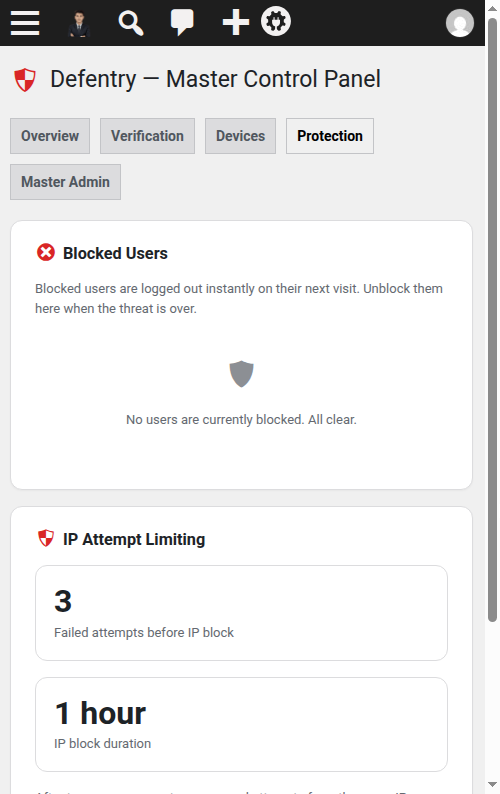
- NEW: Blocked IPs panel — IPs auto-blocked after 3 wrong stop-password attempts (and IPs blocked from the alert banner or Login Activity table) are now listed in Defentry Protection with the block expiry and a one-click Unblock.
- SECURITY: no default stop password anymore — fresh installs start with no password set (verification stays dormant until you set one), installs still using the old public default
2210have it removed automatically with an email to the site admin, and protection cannot be switched on before a stop password exists. - FIX: a trusted device is no longer locked out by an IP block — the Master Admin can always reach the Defentry settings (and its Unblock button) from a verified device, even on a blocked IP.
- Code quality: Plugin Check clean — the gate page escapes its message at output, and the gate’s routing-only AJAX action read carries a documented
phpcs:ignorejustification (no state changes there; every allowed handler verifies its nonce).
2.0.5
- Code quality: documented
phpcs:ignorejustifications for the fiveWordPress.Security.NonceVerification.Recommendedwarnings — all are false positives (display-only$_GETreads; every state-changing handler verifies its nonce). No behavior change.
2.0.4
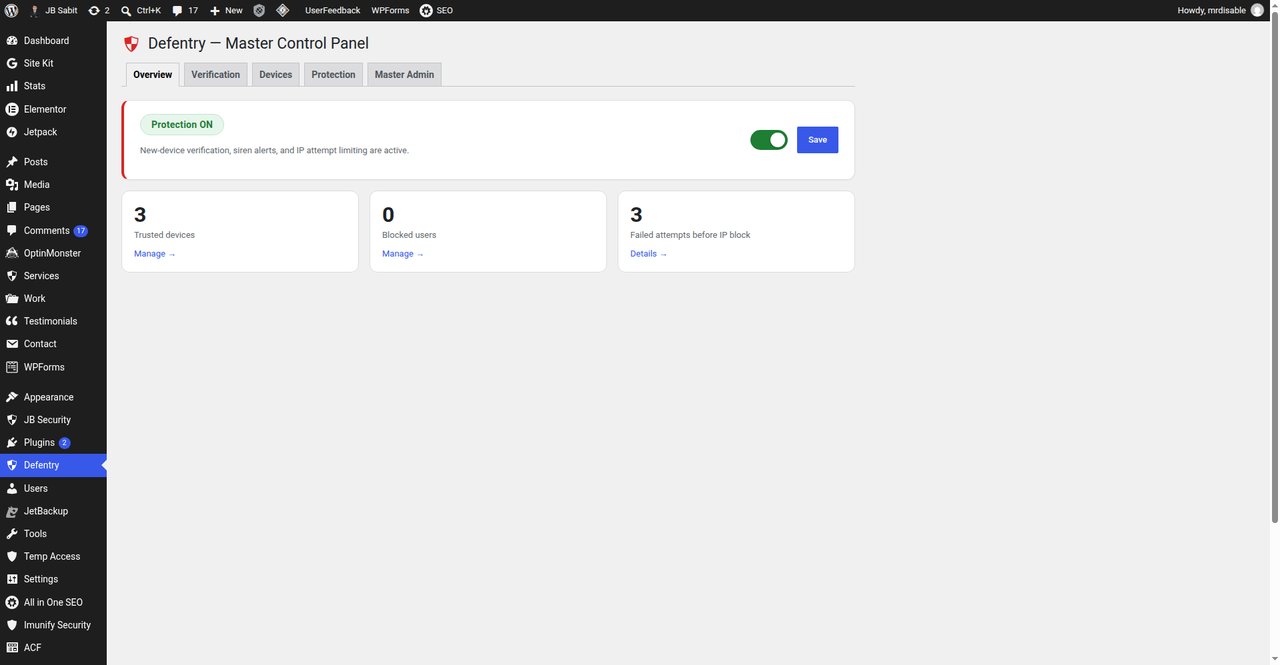
- Redesigned Verification, Devices, Protection, and Master Admin tabs to match the Overview tab: feature toggles instead of checkboxes, device cards per admin, danger-zone reset, blocked-user rows, IP-limit stat tiles, and a Master Admin highlight card.
- FIXED: saving from the Verification or Master Admin tab silently turned protection OFF (status is now only updated by forms that manage it).
- Master-Admin-exclusive control plane: secondary admins no longer see the Defentry menu or dashboard widget once setup is complete. Device verification, alert banners, and the siren still protect every admin account.
- The verification overlay dialog now has its own siren sound toggle, reachable even while the overlay covers the admin notices.
2.0.3
- FIXED: broadcast siren could stay silent on other admins’ browsers — the realtime poller now retries audio playback on user interaction (browser autoplay policy), and the “Mute Siren” button is now a toggle: muted users see “Unmute Siren” to re-enable the alert sound.
2.0.2
- FIXED: settings page showed the old unstyled UI when protection was OFF (v2 stylesheet now loads on the settings page and dashboard regardless of status).
- NEW: realtime broadcast poller — other logged-in admins now see and hear the new-device alert within ~25 seconds without reloading the page; the banner auto-clears when the alert ends.
- Warning banner now blinks with a red alarm glow to catch the eye.
- NEW: “Block IP” button on the alert banner (Master Admin) instantly blocks the new device’s IP for 1 hour; “Block User” now also instantly blocks the alert IP.
- Banner action buttons (trust/block/mute) now work on every admin page, not just the settings page.
2.0.1
- Red alarm blink animation on the verification overlay backdrop (respects prefers-reduced-motion).
2.0
- Complete UI/UX overhaul: tabbed Master Control Panel (Overview, Verification, Devices, Protection, Master Admin) with a status card, protection toggle, and live stat tiles; 3-step first-run setup wizard; redesigned new-device verification overlay (modern card, shield emblem, smooth entrance animation, fully responsive, reduced-motion aware); new “Defentry Security” dashboard widget; polished real-time alert banner. No security-logic changes — all protection behavior is identical to 1.2.x.
1.2.3
- Directory assets finalized: real screenshots from a live site, animated siren icon and cinematic banner.
- Expanded SEO readme: full FAQ (17 questions), credits, and links.
1.2.2
- SEO readme rewrite with real directory screenshots, keyword-rich description and honest feature list.
1.2.1
- Plugin Check clean: silenced direct-DB-query warnings in uninstall.php (caching is meaningless during uninstall) and shortened the readme short description to 150 characters.
1.2
- Security: stop password is now hashed with wp_hash_password() and verified server-side only — the hash is never printed to the page and the client-token bypass is removed. Plaintext passwords are never stored or displayed.
- Security: only the device owner or the Master Admin can trust a device for another user.
- Security: IP detection now uses REMOTE_ADDR only (X-Forwarded-For / Client-IP are client-spoofable).
- New-device email/broadcast alerts are sent once per device instead of on every page load.
- Admin menu renamed from “Siren Protector” to “Defentry”; security headers are now actually sent (previously dead code).
- Accessibility: alert banner no longer hard-blinks; animation respects prefers-reduced-motion.
- Added uninstall.php — all options, transients and user meta are removed on uninstall.
- Readme rewritten to describe only features the plugin actually has.
1.1
- Changed prefix from
wrstoscbrfor all options, transients, user meta, cookies, and scripts to avoid conflicts with other plugins. - Improved script and style enqueuing to load only on relevant admin pages.
- Added data migration during activation to preserve existing settings and user data.
1.0
- Initial release with device-based authentication, siren alerts, master admin control, and IP blocking.